Why Wireless Headsets Help Posture During Long Work Days
Wireless headsets improve posture by keeping your head upright and your hands free, eliminating the single worst habit in office ergonomics: cradling a phone between your ear and shoulder. That one move compresses the cervical spine, twists the neck, and builds the kind of chronic tension that turns a normal Tuesday into a 9 PM heating pad situation. If you spend eight or more hours at a screen, understanding why wireless headsets help posture is not a minor productivity tip. It is a direct line to less pain, better alignment, and a body that does not feel wrecked by 5 PM.
How wireless headsets reduce neck and shoulder strain
The core problem with traditional phone use is not the phone itself. It is the posture you adopt to hold it. Cradling a handset between your ear and shoulder forces your cervical spine into a sustained lateral bend, which accumulates strain across the muscles of the neck, upper back, and shoulders. Do that for 30 minutes a day over months, and you are building a reliable path to chronic musculoskeletal tension.
Wireless headsets remove that problem entirely. They keep your head in a neutral, upright position during every call, which is the position your spine is designed to support. Studies show up to 31% less strain with wireless headsets in office work compared to traditional handset use. That reduction is not trivial. It means less fatigue, fewer tension headaches, and a lower risk of developing the kind of persistent neck pain that sends people to physical therapists.

The mechanism is straightforward. When your head sits directly over your shoulders, your neck muscles carry roughly 10–12 pounds of skull weight in balance. Tilt your head forward or sideways by even 15 degrees, and the effective load on those muscles multiplies significantly. Wireless headsets prevent that tilt by freeing both hands and keeping your gaze forward.
Key strain-reduction benefits of switching to a wireless headset:
- Neutral cervical alignment during calls, preventing lateral neck bending
- No shoulder elevation from cradling, which reduces trapezius tension
- Hands-free operation that lets you type, write, or gesture without awkward compensations
- Reduced cumulative load on the cervical spine across a full workday
Does freedom of movement actually improve your posture?
Yes. Static sitting is one of the most underrated contributors to poor posture, and wireless headsets directly address it. When you are tethered to a desk by a wired handset or a short cable, your body stays locked in one position for the entire duration of a call. That static load builds tension in the hip flexors, lower back, and shoulders simultaneously.
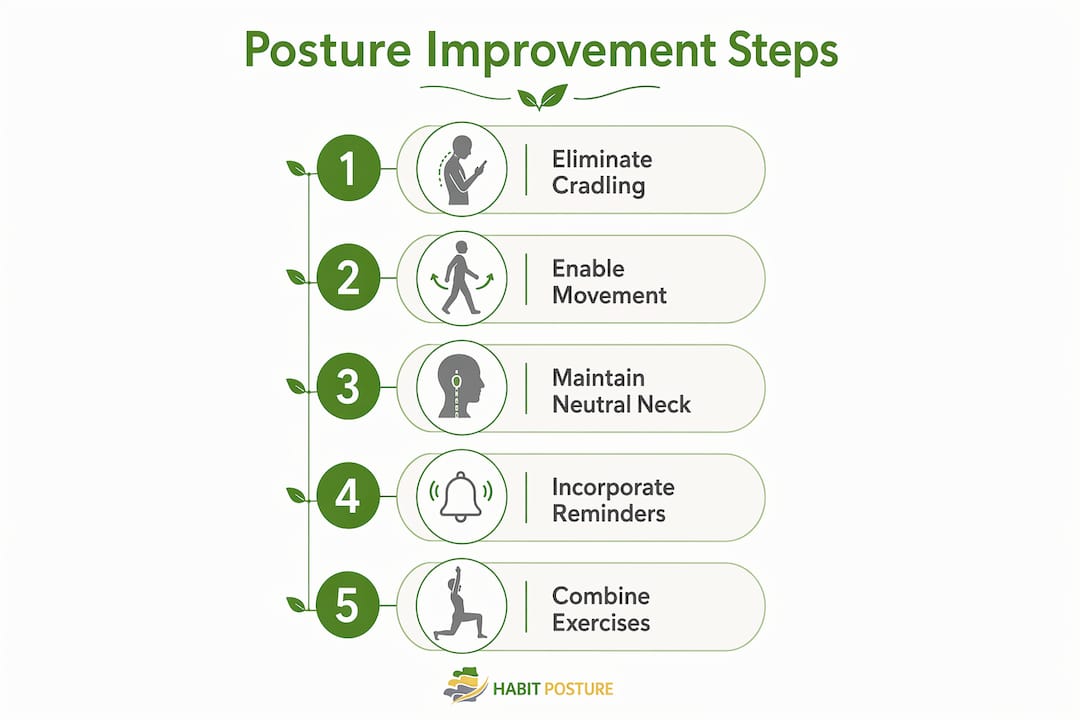
Wireless headsets with ranges of 10–100 meters and battery life of 15–35 hours give you the physical freedom to move during calls. That is not a minor spec. It means you can stand up, pace, stretch your arms, or walk to a window without interrupting a conversation.
Here is why that matters for posture specifically:
- Standing during calls activates your postural muscles, the deep spinal stabilizers that go dormant when you sit for hours.
- Pacing shifts your weight and changes the load distribution across your spine, preventing the stiffness that comes from holding one position.
- Stretching mid-call breaks the forward-head cycle that builds up when you lean toward a screen.
- Moving away from your desk resets your visual focus and reduces the tendency to hunch toward a monitor.
Frequent positional shifts are the most effective way to prevent tech neck and the muscle stiffness that comes with it. Wireless headsets make those shifts possible without sacrificing productivity. Wired models simply do not offer that option.
Pro Tip: Set a recurring reminder every 45 minutes to stand and pace for the duration of your next call. A wireless headset makes this effortless. Over a week, those movement breaks add up to meaningful relief for your lower back and shoulders.
What ergonomic features in a headset actually support good posture?
Not every wireless headset helps your posture. Some actively undermine it. The design of the headset itself determines whether it supports neutral alignment or creates a new set of problems.
Improperly weighted or heavy headsets pull your head forward, creating the same forward-head posture you were trying to avoid. This happens subconsciously. You do not notice the lean until your neck is already fatigued. Heavier headsets cause sustained forward leaning that increases fatigue and discomfort over a full workday.
The features that actually matter for posture support:
- Lightweight materials: A headset under 200 grams keeps the load on your head minimal. Heavier models cause the subtle forward tilt that undermines ergonomic alignment during extended wear.
- Balanced weight distribution: The weight should sit evenly across the headband, not concentrated on one ear cup or the front of the frame.
- Adjustable headband and ear cups: A proper fit prevents you from tilting your head to keep the headset in place. Adjustable ear cups and mic positioning enhance ergonomic fit and prevent muscle fatigue.
- Adequate cushioning: Firm padding on the ear cups and headband reduces pressure points that cause you to shift your head position unconsciously.
Pro Tip: Before buying, hold the headset in your hand and check whether it feels balanced front to back. If one side is noticeably heavier, that imbalance will show up in your neck muscles after an hour of wear.
The ergonomic audio solutions that genuinely support posture are the ones designed with weight and balance as primary concerns, not just sound quality or wireless range.
How to integrate wireless headsets into a real posture strategy
A wireless headset is an enabler, not a cure. Headsets support but do not replace the muscle strengthening of your core, neck, and shoulders that lasting posture health requires. Passive reliance on any single tool, including a well-designed headset, will not prevent musculoskeletal tension if the rest of your workday is spent slumped in a chair.
The 90-degree ergonomic rule is a useful starting point for your workstation. Your hips, knees, and elbows should each sit at roughly 90 degrees. Your monitor should be at eye level so your head does not tilt down or forward. Maintaining upright spinal alignment during sitting, standing, and walking is the foundation that ergonomic tools like wireless headsets build on, not replace.
Common mistakes people make when relying on wireless headsets for posture improvement:
- Wearing the headset all day without taking it off, which creates its own pressure points
- Moving freely during calls but returning to a slumped position at the desk between calls
- Buying a wireless headset for a fixed-desk role where battery maintenance and cost outweigh the mobility benefit
- Ignoring monitor height and chair setup while expecting the headset to carry all the ergonomic load
The most effective approach pairs wireless headset use with daily posture habits that include targeted exercises for the neck, shoulders, and core. Physical therapists consistently recommend strengthening the deep cervical flexors and the mid-back muscles as the foundation of any posture improvement plan. A wireless headset helps you move more and strain less during calls. Exercises build the strength to hold good alignment when you are not on a call.
For workers in home offices or flexible setups, the combination of a wireless headset and a properly arranged workstation is especially effective. Habitposture covers this in detail for people working without a dedicated office space, where environmental control is limited but posture habits still matter.
Key Takeaways
Wireless headsets improve posture by eliminating phone cradling, enabling movement during calls, and reducing cumulative neck and shoulder strain when paired with active ergonomic habits.
| Point | Details |
|---|---|
| Eliminate cradling immediately | Switching to a wireless headset removes the single biggest source of neck strain in office phone use. |
| Movement is the real benefit | Wireless range of 10–100 meters lets you stand, pace, and stretch during calls, breaking static sitting habits. |
| Headset design matters | Lightweight, balanced headsets prevent forward head tilt; heavy or unbalanced models create new strain. |
| Headsets need ergonomic backup | Pair your headset with a 90-degree workstation setup and posture exercises for lasting results. |
| Match headset type to your role | Fixed-desk workers may not need wireless; mobility-heavy roles gain the most from hands-free, wireless solutions. |
The headset is only as good as the habit around it
I have watched people spend serious money on premium wireless headsets and still end up with the same neck pain they had before. The headset was not the problem. The habit was. They moved freely during calls, then immediately folded back into a forward hunch the moment they returned to their keyboard. The headset did its job. The rest of the workday did not.
The workers I have seen get real, lasting relief from wireless headsets are the ones who treat the headset as a prompt, not a solution. Every call becomes a cue to stand up, shift position, or at least sit tall. That behavioral shift is where the posture benefit actually lives.
My honest advice: start with the lightest headset you can find that fits your work style. If you are at a fixed desk all day, a wired model with good ergonomic design may serve you just as well without the battery management. If you move between spaces or take long calls, wireless is genuinely worth it. But in both cases, the headset is the starting point. Building posture strength for office workers through targeted exercises is what makes the benefit stick.
The uncomfortable truth is that no piece of gear fixes posture on its own. What it can do is make the right habits easier to build. That is exactly what a good wireless headset does when you use it with intention.
— Thomas
Posture gear that works while you work
Wireless headsets are one piece of the picture. Habitposture builds the rest of it.
If your neck aches by 2 PM and your shoulders are rolled forward before you even notice, the problem is not one bad habit. It is a full-day pattern. Habitposture designs posture support gear for people who spend eight or more hours at a screen, whether that is a standing desk, a gaming chair, or a kitchen table. No lectures. No guilt. Just practical tools that work alongside your existing setup, including the wireless headset you already use or are thinking about buying. Check out what Habitposture offers and build a posture routine that actually fits your day.
FAQ
Why do wireless headsets help posture more than regular phones?
Wireless headsets keep your head in a neutral, upright position by eliminating the need to cradle a handset between your ear and shoulder. That cradling forces a sustained lateral neck bend, which is the primary driver of upper body strain during phone calls.
How much can a wireless headset reduce neck strain?
Research shows up to 31% less strain with wireless headsets in office settings compared to traditional handset use. The reduction comes from maintaining neutral cervical alignment throughout the call.
Does headset weight affect posture?
Yes. Heavy or unbalanced headsets cause a subconscious forward head tilt that undermines ergonomic benefits during extended wear. Choose a lightweight model with even weight distribution across the headband.
Should fixed-desk workers bother with wireless headsets?
Not necessarily. Battery maintenance and cost can outweigh the mobility benefit for workers who stay at one desk all day. A wired headset with good ergonomic design may deliver similar posture benefits at lower cost.
Can a wireless headset fix my posture on its own?
No. Headsets are enablers, and lasting posture health requires active muscle engagement of the core, neck, and shoulders alongside ergonomic tools. Use your headset as a prompt to move more, then support it with targeted exercises and a proper workstation setup.