What Is Gamer Posture? Fix It for Good in 2026
Gamer posture is defined as the characteristic musculoskeletal pattern that develops from spending 4–12 hours daily at a screen, producing forward head position, rounded shoulders, and shortened hip flexors. The Human Factors and Ergonomics Society recognizes this pattern as a direct consequence of prolonged static sitting combined with repetitive upper-limb movements. 40–60% of office workers report neck or shoulder pain strongly linked to total sitting time. That number applies equally to gamers grinding ranked matches and remote workers cycling through back-to-back video calls. The good news: the pattern is reversible. Understanding what drives it is the first step.
What is gamer posture and how do you recognize it?
Gamer posture is not a single position. It is a cluster of physical adaptations your body makes when you hold the same posture for hours at a time. Three patterns show up consistently: forward head posture, rounded shoulders, and anterior pelvic tilt.
Forward head posture is the most visible sign. Your head drifts forward of your shoulders as you lean toward the screen. Each inch of forward head position adds roughly 10 pounds of effective load to your cervical spine. At two to three inches of drift, that is 20–30 extra pounds your neck muscles carry all session long.
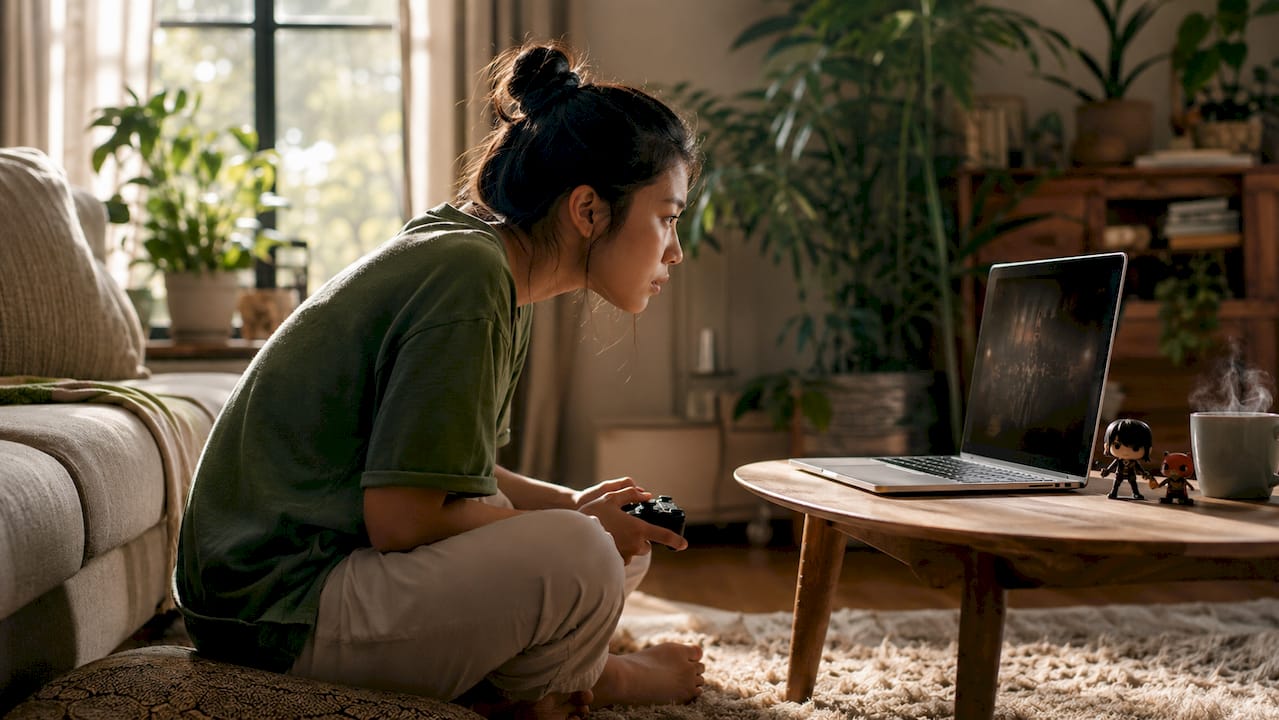
Rounded shoulders follow from the same habit. Your chest muscles shorten and tighten while your upper back muscles stretch and weaken. The result is a hunched upper body that looks and feels like you have been carrying a heavy backpack for years.
Anterior pelvic tilt is the least talked-about pattern. Prolonged sitting causes hip flexor shortening and upper trapezius dominance, pulling your pelvis forward and compressing your lower back. Daneshmandi et al.'s 2017 review confirmed this pattern in office workers, and gamers face the same risk.
Common symptoms to watch for include:
- Neck stiffness or aching that starts around the two-hour mark
- Shoulder tension that builds through the session
- Lower back pain or a feeling of compression after sitting
- Wrist numbness or tingling from repetitive mouse and keyboard use
- Tension headaches originating at the base of the skull
Pro Tip: Catch these symptoms early. Mild stiffness that clears up after standing is a warning sign, not something to push through. Ignoring it for weeks is how acute discomfort becomes a chronic problem.
What ergonomic principles underlie a good gaming position?
Ergonomics is the science of fitting your environment to your body, not the other way around. For gamers and remote workers, a few specific measurements make the biggest difference.
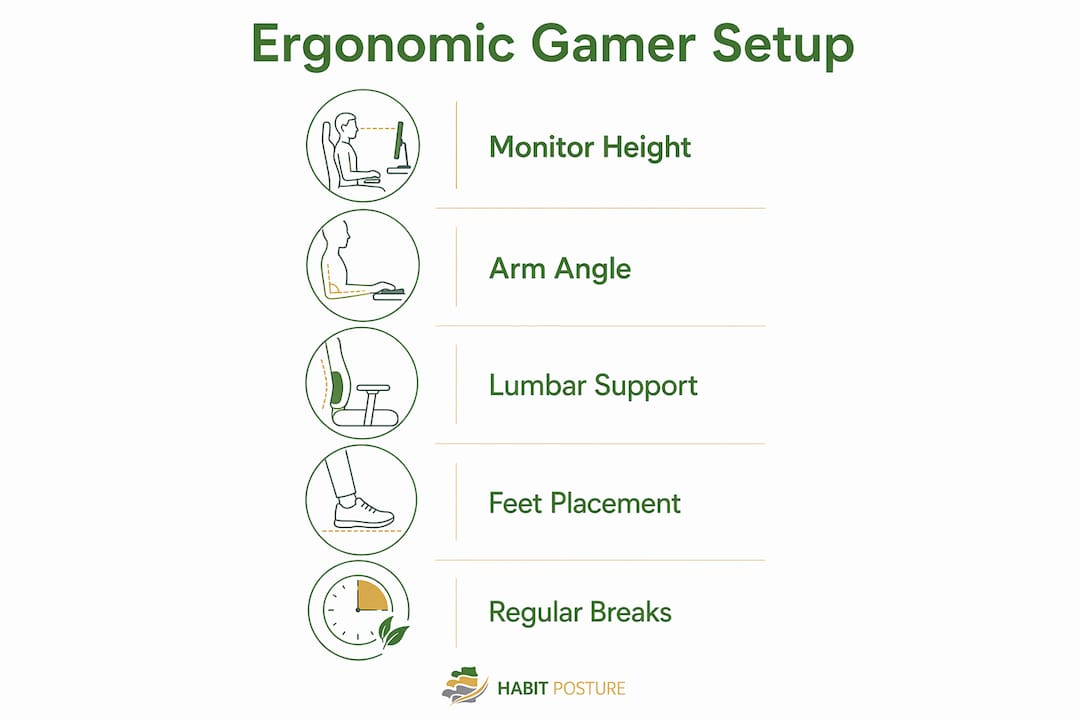
The standard ergonomic setup positions your keyboard and mouse so your elbows sit at 90–110 degrees. Your monitor should be 20–26 inches from your eyes, with the top of the screen at or just below eye level. Desk height for most adults falls between 28 and 30 inches. These numbers are not arbitrary. They are derived from biomechanical research on neutral joint positions that minimize muscle load.
Lumbar support is another non-negotiable. Positioning lumbar support 3–5 inches above the seat base prevents your lower back from rounding during long sessions, following NIOSH ergonomic office standards. Most people set lumbar support too high, which pushes the mid-back forward instead of supporting the natural inward curve of the lower spine.
One of the most persistent myths in gaming ergonomics involves chair design. Racing-style gaming chairs are marketed aggressively, but ANSI/BIFMA-certified office chairs outperform them on functional lumbar support for long-term health. The bucket seat shape of most racing chairs locks you into a fixed recline that suits neither keyboard use nor neutral spinal alignment.
| Setup element | Common mistake | Correct approach |
|---|---|---|
| Monitor height | Too low, causing neck flexion | Top of screen at or just below eye level |
| Keyboard position | Too high, raising shoulders | Elbows at 90–110 degrees, shoulders relaxed |
| Lumbar support | Too high or absent | 3–5 inches above seat base |
| Chair type | Racing-style bucket seat | ANSI/BIFMA-certified ergonomic chair |
| Feet position | Dangling or crossed | Flat on floor, thighs parallel or angled slightly down |
Pro Tip: Before spending money on new gear, spend 20 minutes adjusting what you already have. Optimizing your existing setup delivers more benefit than most specialized gaming products. The Human Factors and Ergonomics Society confirms this finding.
Check out Habitposture’s ergonomics in your gaming setup guide for a room-by-room breakdown of what to adjust first.
How does prolonged static posture damage your body over time?
Static posture is the real problem. Your body is built for movement, not for holding one position for four to eight hours. When you stay still, tissues adapt to the shape you hold most often.
Visual strain appears after just two hours of continuous screen exposure, according to the American Academy of Ophthalmology. Eye fatigue compounds the postural problem because you unconsciously lean closer to the screen as your vision tires, increasing forward head drift.
Soft-tissue habituation is the core mechanism behind gamer posture. Muscles held in a shortened position for long periods lose their ability to lengthen fully. Muscles held in a stretched position weaken. Over weeks and months, this imbalance becomes your body’s new default. The pattern can be reversed through consistent movement breaks and targeted strengthening, but it does not fix itself passively.
The risks compound beyond muscle imbalance. Repetitive wrist and finger movements during gaming create conditions for carpal tunnel syndrome and tendinitis. Poor posture also carries a psychological cost. Research on posture and mood in gamers shows that slumped positions correlate with lower energy and worse mood, which affects both performance and recovery.
Practical steps to interrupt static loading:
- Apply the 20-20-20 rule for eyes: every 20 minutes, look at something 20 feet away for 20 seconds
- Stand, stretch, or walk for two minutes every 30–60 minutes of sitting
- Rotate between two or three comfortable positions rather than locking into one “perfect” posture
- Set a phone timer or use software reminders to enforce breaks during long sessions
What exercises and habits actually improve your gaming posture?
Fixing gamer posture requires two things working together: a better setup and a body that can hold better positions. Neither works without the other.
Targeted exercises performed three times per week build the strength and flexibility needed to sustain good posture. Rehabilitation research supports the following routine:
- Face pulls (3 sets of 15 reps): Use a resistance band anchored at face height. Pull toward your nose, keeping elbows high. This directly targets the weak upper back muscles that allow shoulders to round forward.
- Chin tucks (3 sets of 10 reps): Sit tall and gently draw your chin straight back, creating a “double chin.” Hold for five seconds. This retrains the deep cervical flexors that control head position.
- Glute bridges (3 sets of 15 reps): Lie on your back, feet flat, and drive your hips toward the ceiling. This activates the glutes and counters the hip flexor shortening caused by prolonged sitting.
- Wall slides (3 sets of 10 reps): Stand with your back against a wall, arms in a goalpost position, and slide them overhead while keeping contact with the wall. This restores shoulder mobility and scapular control.
- Hip flexor stretches (60 seconds per side): Kneel on one knee in a lunge position and push your hips forward gently. This directly addresses the anterior pelvic tilt pattern.
One keyboard habit causes more wrist injuries than most gamers realize. Using flip-out keyboard feet to tilt the board upward forces your wrists into dorsiflexion, a position that strains tendons with every keystroke. A flat or slightly negative tilt keeps your wrists neutral and reduces repetitive strain risk significantly.
For lower back pain from gaming, chair height adjustment is the fastest fix. Your feet should rest flat on the floor with your thighs parallel to the ground or angled slightly downward. If your chair is too high, your feet dangle and your pelvis tilts. If it is too low, your knees rise above your hips and your lower back rounds.
Pro Tip: Consistency beats intensity every time. Ten minutes of chin tucks and face pulls three times a week outperforms a single two-hour stretching session on the weekend. Your nervous system learns posture through repetition, not effort.
Posture improvement without a gym is entirely achievable with a resistance band and a wall. No equipment budget required.
Key Takeaways
Gamer posture is a reversible pattern caused by static sitting and repetitive movement, and correcting it requires both ergonomic setup changes and consistent physical habits.
| Point | Details |
|---|---|
| Core definition | Gamer posture combines forward head position, rounded shoulders, and anterior pelvic tilt from prolonged screen time. |
| Cervical spine load | Each inch of forward head drift adds roughly 10 pounds of load to the cervical spine. |
| Ergonomic setup | Elbows at 90–110 degrees, monitor 20–26 inches away, and lumbar support 3–5 inches above the seat base. |
| Chair choice matters | ANSI/BIFMA-certified office chairs provide better functional lumbar support than racing-style gaming chairs. |
| Exercise routine | Face pulls, chin tucks, glute bridges, and wall slides performed three times per week build lasting postural strength. |
The posture advice nobody wants to hear
I have spent years watching people buy expensive gear to solve a problem that is mostly behavioral. A $600 racing chair does not fix gamer posture. Adjusting your existing chair, moving your monitor six inches back, and standing up every 45 minutes does.
The most common misconception I encounter is that good posture means sitting perfectly still in a perfectly aligned position. That is not how the body works. Habitual movement is more effective than static perfection. Your spine needs variety, not rigidity. The goal is to cycle through several comfortable positions throughout a session, not to hold one “correct” posture until your muscles cramp.
The second misconception is that posture problems require medical intervention before you can start fixing them. Most gamer posture patterns respond well to three things: a better-configured setup, a few targeted exercises done consistently, and more frequent movement breaks. You do not need a physical therapist to start. You need a timer and a resistance band.
What I find genuinely encouraging is that soft-tissue adaptations are reversible. The muscles that have shortened and weakened over months of gaming can regain their function. It takes weeks, not years. The people who see results fastest are not the ones who buy the most gear. They are the ones who make small, consistent changes and stick with them.
Treat posture as a habit, not a destination. That framing changes everything.
— Thomas
Habitposture gear built for screen-heavy lifestyles
Habitposture was built for people who spend their days glued to a screen, whether that is a gaming monitor, a work laptop, or both. The brand’s posture support products are designed to work while you work, not to replace movement or force you into a rigid position.

Habitposture’s posture support collection includes wearable supports that retrain your body’s default alignment without bulky bracing or discomfort. Pair the gear with the free educational content on the Habitposture blog, which covers everything from desk setup ergonomics to chair height adjustment for long sessions. If you are serious about fixing your posture for good, Habitposture gives you the tools to make it a habit.
FAQ
What is gamer posture exactly?
Gamer posture is the musculoskeletal pattern that develops from extended screen use, characterized by forward head position, rounded shoulders, and shortened hip flexors. It affects both gamers and remote workers who sit for four or more hours daily.
How do I know if I have bad gaming posture?
Neck stiffness, shoulder tension, lower back aching, and wrist numbness during or after gaming sessions are the primary indicators. Forward head drift of more than one inch from neutral is a reliable physical sign.
Does a gaming chair fix poor posture?
Racing-style gaming chairs typically lack the functional lumbar support needed for long-term spinal health. ANSI/BIFMA-certified ergonomic office chairs are a better choice for extended sitting.
How often should I take breaks while gaming?
Standing or moving for two minutes every 30–60 minutes interrupts static loading and reduces tissue adaptation. The 20-20-20 rule addresses eye strain separately: look 20 feet away for 20 seconds every 20 minutes.
What exercises help correct gamer posture?
Face pulls, chin tucks, glute bridges, and wall slides performed three times per week directly target the muscle imbalances caused by prolonged gaming. Consistency over several weeks produces measurable improvement in posture and pain reduction.