The Role of Armrests in Posture for Desk Workers
Armrests are defined as the primary mechanical support that keeps your shoulders relaxed and your spine properly aligned during prolonged sitting. The role of armrests in posture goes far beyond comfort. When set correctly, they reduce the load on your trapezius muscles, prevent forward head drift, and stop your shoulders from creeping toward your ears by 2 PM. A 2026 biomechanical study confirmed that lateral elbow support produces superior trunk alignment and measurably lower shoulder muscle demand. Ergonomic standards set the baseline armrest height at 7–10 inches above the seat cushion to achieve a 90–100° elbow angle. Habitposture builds its posture education around exactly this kind of evidence.
How do armrest height, width, and depth affect posture?
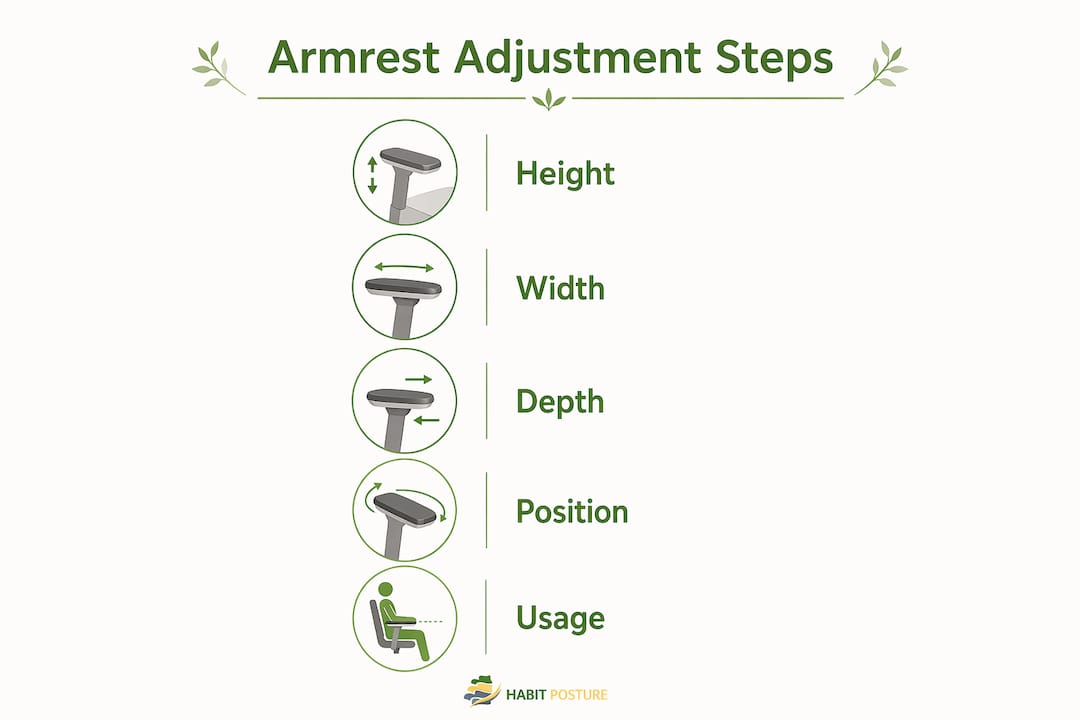
Armrest height is the single most impactful dimension for shoulder health. Recommended armrest height sits at 7–10 inches (18–25 cm) above the seat cushion, placing your elbows at a 90–100° angle. When armrests sit below that range, your shoulders drop and your torso collapses sideways. When they sit above it, your shoulders shrug continuously, which is a direct path to trapezius fatigue.
Armrest width determines how close your elbows stay to your torso. Optimal armrest width matches your shoulder breadth so your elbows rest naturally at your sides. Armrests set too wide force your elbows outward, increasing lateral shoulder load and external rotation. That rotation adds strain to the rotator cuff and pulls your upper back out of alignment.

Armrest depth controls how much of your forearm is supported. Full forearm support is critical during mouse and keyboard work because unsupported forearms create constant low-level tension in the wrist and shoulder. Fixed armrests that cannot extend forward often leave your forearm hanging, which forces a subtle forward lean that compounds over hours.
Here is how each adjustment dimension affects your body:
| Adjustment | Too Low or Too Short | Too High or Too Wide | Correct Setting |
|---|---|---|---|
| Height | Torso collapses, lateral lean | Shoulder shrug, trapezius strain | 90–100° elbow angle |
| Width | Elbows pinch inward, restricted | Elbows flare out, shoulder rotation | Elbows close to torso |
| Depth | Forearm unsupported, wrist tension | Desk crowding, forward lean | Full forearm rests flat |
Pro Tip: For mouse-heavy sessions, slide your armrest forward until your entire forearm from elbow to wrist rests on the pad. Your shoulder will drop noticeably. That drop is the tension leaving.
What does biomechanical research say about armrests and spinal alignment?
Armrests are active posture controls, not passive furniture. A 2026 multidimensional biomechanical evaluation in healthy young adults showed that armrest support improves trunk posture and reduces trapezius muscle activation compared to sitting without arm support. That reduction matters because the trapezius is the muscle most people feel burning at the end of a long work session.
Electromyography evidence shows that fully adjustable armrests decrease upper trapezius and deltoid activity consistently throughout prolonged sitting. Less muscle activation means less fatigue accumulation. Your body is not fighting to hold your arms up all day.
Sitting without any arm support forces your neck and shoulder muscles to carry the full weight of your arms continuously. The average arm weighs roughly 8–10 pounds. Multiply that by hours, and you understand why unsupported sitting creates the kind of deep ache that no amount of stretching fully fixes.
Ergonomic principles from 2026 industry guides describe armrests as active controls for neck and shoulder mechanics, specifically designed to keep shoulders down, forearms lightly supported, and elbows close to the body. When you treat your armrests as a tool rather than a shelf, your entire upper body posture shifts.
Common armrest adjustment errors and their impact on posture
Most people never adjust their armrests at all. They sit down, start working, and accept whatever position the chair came set to. These are the most common errors and what each one costs you:
- Armrests too high. Your shoulders shrug to meet them. Armrests set too high cause continuous trapezius contraction, which shows up as neck burning by mid-afternoon. Most people blame their monitor height or stress. The real cause is often a half-inch too much on the armrest.
- Armrests too wide. Your elbows flare outward. That external rotation increases shoulder joint load and pulls your upper back into a rounded position over time.
- Armrests not adjusted for the task. Using the same armrest position for typing, mousing, and reading creates a compromise that serves none of those tasks well.
- Removing armrests without fixing the rest of the setup. Removing armrests outright is often a misguided fix. Without arm support, people lean forward or tilt sideways to find relief, which increases lumbar and cervical strain. The chair and desk heights need to be addressed first.
Pro Tip: If you feel neck tension building after lunch, lower your armrests by one click before reaching for pain relief. It takes five seconds and often eliminates the problem entirely. Check out Habitposture’s guide on workplace posture habits for a full adjustment checklist.
Poor armrest setup also creates a feedback loop. Discomfort leads to shifting, shifting leads to slouching, and slouching leads to the kind of end-of-day stiffness that feels like a full-body problem. Fixing the armrests breaks that loop at the source.
Task-specific armrest usage for gaming and office work
Armrest needs change with the task. A single static position does not serve a full workday or a long gaming session. Here is how to adjust by activity:
-
Typing. Angle your armrests slightly inward so your forearms point toward the keyboard at a natural angle. This keeps your wrists in a neutral position and prevents ulnar deviation, the sideways bend that causes repetitive strain over time.
-
Mouse-heavy work. Extend armrest depth forward so your full forearm rests on the pad. Armrest depth adjustment is critical for mouse use because incorrect depth forces a forward lean and causes wrist micro-tension during precision tasks.
-
Gaming. Gamers tend to lean forward during intense moments, which pulls the elbows off the armrests entirely. Set armrests slightly higher than the typing position so they catch your arms when you lean in. This prevents the full shoulder load from transferring to your neck during long ranked sessions.
-
Reading or video calls. Lean back slightly and let the armrests carry your arm weight fully. This is the one position where you can actually rest your upper body. Use it deliberately rather than defaulting to a forward hunch.
-
Shifting between tasks. Adjust armrests when you switch activities rather than staying locked in one position. Adjustable armrests that accommodate body shifts throughout the day prevent strain accumulation that builds from static postures. Dynamic adjustment is not fussiness. It is how you protect your body across an eight-hour session.
The difference between a gamer and an office worker is mostly the intensity of forward lean and the grip tension on the mouse. Both groups benefit from the same principle: keep the forearm supported, the elbow close to the body, and the shoulder down.
Key takeaways
Proper armrest adjustment is the fastest, most underused fix for upper body tension during prolonged sitting, and it requires height, width, and depth to all be set correctly for the task at hand.
| Point | Details |
|---|---|
| Height is the priority | Set armrests at 7–10 inches above the seat to achieve a 90–100° elbow angle. |
| Width keeps shoulders neutral | Armrests matching shoulder breadth prevent external rotation and upper back rounding. |
| Depth matters for mouse work | Full forearm support during mouse tasks eliminates wrist tension and forward lean. |
| Armrests are active tools | Lateral elbow support reduces trapezius activation and improves trunk alignment, per 2026 research. |
| Never remove without fixing the setup | Removing armrests without correcting chair and desk height increases lumbar and cervical strain. |
What I’ve learned after years of watching people ignore their armrests
Most ergonomic advice focuses on monitor height and chair lumbar support. Armrests get a footnote. That is backwards. In my experience, armrest height is the single adjustment that produces the most immediate relief for the most people, and it takes less than 30 seconds to change.
The thing that surprises people most is the depth adjustment. Everyone knows to raise or lower their armrests. Almost nobody thinks about sliding them forward. When I watch someone work with their forearm hanging off the back edge of the pad, I can see the shoulder tension from across the room. Sliding the armrest forward two inches changes their entire upper body position instantly.
The other thing I push back on is the idea that removing armrests creates freedom of movement. It does the opposite. Without support, your arms become dead weight your neck and shoulders carry all day. The chair height and armrest relationship is tightly connected, and pulling one piece out without addressing the others creates new problems.
Gamers get this wrong in a specific way. They set armrests for their resting position and then lean forward for three hours straight without any support. The armrests become decorative. The fix is simple: set them slightly higher so they meet your arms when you lean in, not just when you sit back.
Armrests are not a luxury feature. They are the mechanism that lets your shoulders do nothing, which is exactly what they should be doing while you work.
— Thomas
Habitposture’s approach to ergonomic posture support
Spending eight or more hours at a desk or in a gaming chair takes a real toll on your body. Habitposture is built for people who know that feeling and want a practical fix, not a lecture.
Habitposture combines ergonomic education with posture support gear designed for real work and real gaming sessions. Whether you are dealing with mid-afternoon neck tension or chronic shoulder rounding, the ergonomic posture solutions at Habitposture give your body the support it needs to build better habits over time. Pair the right gear with the right armrest setup, and your body will stop fighting your workstation by the end of the week.
FAQ
What is the correct armrest height for good posture?
The correct armrest height places your elbows at a 90–100° angle, which corresponds to 7–10 inches above the seat cushion. This position keeps your shoulders relaxed and prevents trapezius strain.
Do armrests actually improve spinal alignment?
Yes. A 2026 biomechanical study found that lateral elbow support measurably improves trunk posture and reduces shoulder muscle activation compared to sitting without arm support.
Should I remove my armrests if they feel uncomfortable?
Removing armrests without first correcting chair and desk height typically worsens posture. Adjust the height, width, and depth of your armrests before removing them entirely.
How should gamers adjust armrests differently from office workers?
Gamers benefit from setting armrests slightly higher to support the arms during forward lean, while office workers should prioritize depth adjustment for mouse tasks and inward angle for typing.
Why does my neck burn in the afternoon even with armrests?
Armrests set even slightly too high cause a continuous subconscious shoulder shrug, which leads to sustained trapezius contraction felt as neck burning by mid-afternoon. Lowering the armrests by one adjustment click often resolves it.