Tech Neck Relief: Simple Fixes and Exercises That Work
Do this first: raise your screen to eye level, perform chin tucks, and take a movement break regularly every half hour to hour. Every inch your head drifts forward adds roughly 10 pounds of load to your cervical spine, which is why that familiar 2 PM ache hits so predictably. Start here:
- Screen: Top of your monitor at or just below eye level
- Movement: Stand, stretch, or walk regularly every half hour to hour
- Exercise: 10 chin tucks, holding each for 3 seconds, done three times a day
Key Takeaways
Consistent ergonomic fixes combined with a daily strengthening routine are the most effective path to lasting tech neck relief.
| Point | Details |
|---|---|
| Fix your screen height first | Raise your monitor so the top edge sits at or just below eye level to remove the root cause. |
| Do chin tucks daily | 10 reps, 3-second hold, up to 3 sets per day directly strengthens the deep cervical flexors. |
| Take movement breaks | Stand and move every 30–60 minutes to interrupt the static posture that drives symptoms. |
| Seek care for red flags | Radiating arm pain, numbness, or weakness needs professional evaluation, not more self-care. |
| Habitposture supports the habit | Ergonomic posture correctors and high-back chairs reinforce neutral alignment between exercise sessions. |
Table of Contents
- What gives you immediate tech neck relief today
- How to set up your workstation so it stops causing the problem
- The exercise routine that actually fixes forward head posture
- Common mistakes that make tech neck worse
- When to see a professional for neck pain
- What to expect as you recover
- Daily habits that keep tech neck from coming back
- How stress makes tech neck worse and what to do about it
- Why hydration and nutrition matter for neck health
- Sources
What gives you immediate tech neck relief today
Yale Medicine notes that most tech neck cases are mild and respond well to conservative at-home care. That’s genuinely good news. You don’t need a clinic appointment to start feeling better today.
- Stop the provocative position. Step away from the screen for at least 10–15 minutes. Continuing to hunch through the pain makes muscles guard harder.
- Apply heat or ice. Ice works best early to reduce acute inflammation for short intervals. After a day or two, switch to warm compresses or heating pads to relax tight muscles. Never apply either directly to bare skin.
- Take an OTC pain reliever if appropriate. Ibuprofen or naproxen sodium can reduce both pain and inflammation. Follow label dosing and check with a pharmacist if you take other medications.
- Gentle range-of-motion. Slowly turn your head left and right, then tilt ear to shoulder on each side. Move only to the point of mild tension, never sharp pain. Repeat 5–8 times per direction.
- Break up device use. Experts recommend frequent movement breaks to interrupt the sustained static positions that drive tech neck symptoms.
Pro Tip: Set a phone timer for 30 minutes right now. When it goes off, stand up, roll your shoulders back three times, and reset your screen height before sitting back down. That single habit, repeated consistently, does more than most gadgets.
Stop self-care and seek evaluation if you experience radiating pain down your arm, numbness or tingling in your hands, or sudden severe neck pain with no obvious cause. Those symptoms suggest something beyond muscle fatigue.
How to set up your workstation so it stops causing the problem
The most effective long-term tech neck fix isn’t a stretch or a supplement. It’s removing the cause. Sutter Health recommends raising screens to eye level and using a separate keyboard as two of the highest-impact changes you can make.
Monitor height and distance
Your monitor’s top edge should sit at or just below eye level, at a comfortable arm’s length from your face. If the screen is too low, your head drops forward to read it. A stack of textbooks, a sturdy box, or a monitor riser all work. The visual test is simple: sit back in your chair and look straight ahead. Your gaze should land on the top third of the screen without tilting your chin down.
Laptops need an external keyboard
A laptop screen is almost always too low when the keyboard is at desk height. Raise the laptop on a stand so the screen hits eye level, then plug in an external keyboard and mouse. This one change often eliminates the forward-head position entirely for laptop users. For a full neck alignment setup at your desktop monitor, the same principle applies: screen up, keyboard at elbow height.
Phone positioning
Holding your phone at lap or chest level forces a 45–60 degree head drop. Raise it toward eye level instead, or prop it on a stand during longer sessions. Wireless earbuds or a headset eliminate the worst offender: cradling a phone between your ear and shoulder.
Chair and seat depth
Your chair should support your lower back so you’re not slumping forward to reach the keyboard. Sit with your hips slightly higher than your knees, feet flat on the floor. If the chair lacks lumbar support, a small rolled towel placed at the small of your back works immediately.
Pro Tip: Try the quick chair test: sit relaxed and place one hand behind your neck. If the muscles stay tense even when you recline into the backrest, the chair isn’t supporting your anatomy well enough. A high-back chair or an ergonomic lumbar cushion usually solves it.
Vision and progressive lenses
If you wear progressive or bifocal lenses, you may be tilting your head back to read through the lower portion of the lens. This creates a different but equally damaging neck position. An optometrist can prescribe dedicated computer glasses with the reading zone centered for screen distance, which removes the need to tilt at all.
The exercise routine that actually fixes forward head posture
Passive stretching alone won’t correct tech neck. Strengthening the deep neck flexors and upper-back muscles, combined with thoracic mobility work, produces lasting posture change. A systematic review of randomized controlled trials found that longer therapeutic exercise programs produced greater improvements in craniovertebral angle, pain intensity, and neck functional capacity than shorter ones. Consistency over weeks matters more than intensity on any single day.
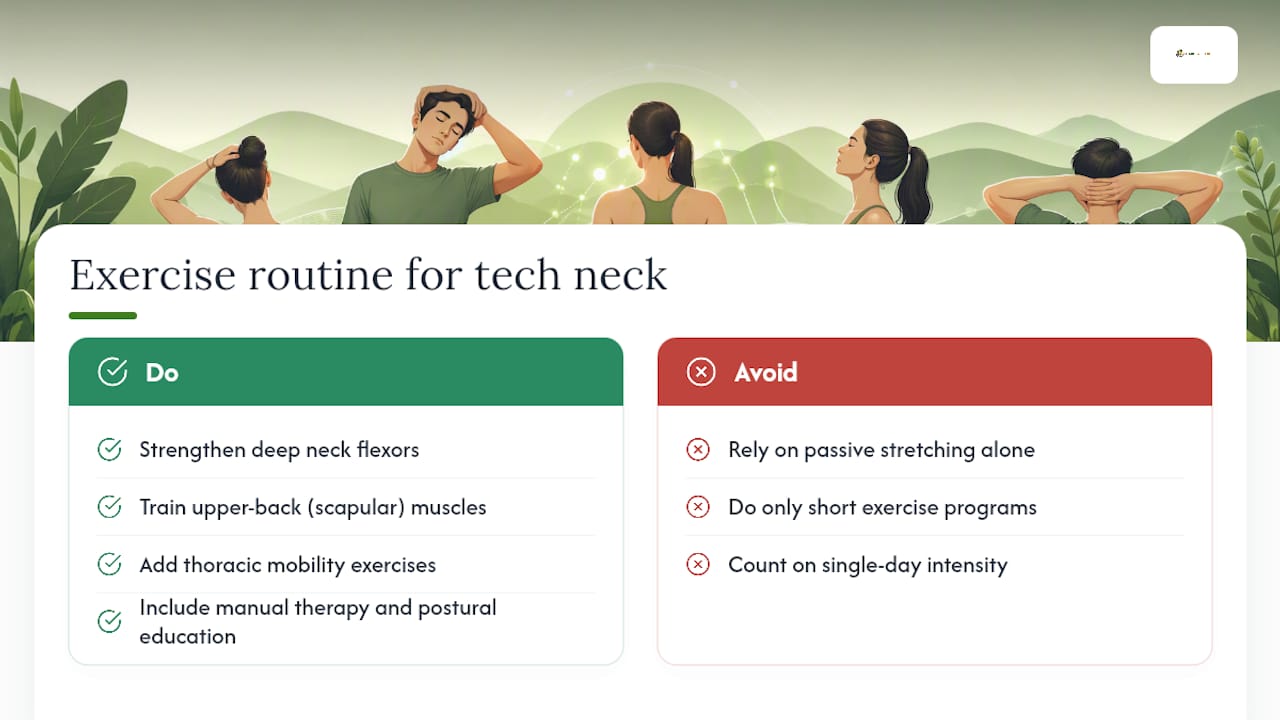
A PMC clinical review confirms that multimodal conservative care combining exercise, manual therapy, and postural education reduces neck pain and improves function. The routine below covers the exercise component you can do at home.
1. Chin tucks
Sit or stand tall. Without tilting your chin down, glide your head straight back as if making a double chin. Hold 3 seconds, release. Sutter Health prescribes this as approximately 10 reps, 3 seconds per hold, up to 3 sets per day. This directly activates the deep cervical flexors that forward head posture weakens.

2. Scapular squeezes
Sit upright with arms at your sides. Squeeze your shoulder blades together and slightly downward, as if trying to hold a pencil between them. Hold 5 seconds, release. Aim for 10–15 reps, 2–3 sets. This counters the rounded-shoulder pattern that almost always accompanies tech neck.
3. Thoracic extension over a chair
Sit in a firm chair. Place your hands behind your head and gently arch backward over the top of the chair back, extending through the mid-back. Hold 3–5 seconds, return to upright. Repeat 8–10 times. UPMC recommends thoracic extension work as part of reversing forward head posture.
4. Wall angels
Stand with your back against a wall, feet a few inches out. Press your lower back, upper back, and head against the wall. Raise your arms to a “goalpost” position with elbows bent at 90 degrees and touching the wall. Slowly slide arms overhead, keeping contact with the wall throughout. Return. Do 10 reps, 2 sets. This trains the posterior shoulder and scapular stabilizers simultaneously.

5. Adult tummy time
Lie face-down on a firm surface with a small pillow under your forehead. Gently lift your head and chest slightly off the floor, squeezing your shoulder blades together. Hold 5 seconds. UPMC highlights this as a practical daily habit that encourages spinal extension and counters the flexion-dominant posture of screen work.
Pro Tip: The most common chin-tuck mistake is nodding the chin downward instead of gliding the head straight back. Keep your gaze level throughout the movement. If your chin drops, you’re working the wrong muscles.
Common mistakes that make tech neck worse
Knowing what not to do is half the battle. Several well-intentioned habits actually slow recovery.
Stretching the already-overstretched muscles on the back of your neck feels good in the moment, but it can reinforce the problem. Those posterior muscles are already lengthened and weakened by forward head posture. Pulling them further with aggressive neck rolls or deep forward bends adds strain without adding strength. The priority is strengthening, not lengthening.
Other mistakes worth avoiding:
- Shrugging during exercises. Elevating your shoulders during chin tucks or scapular squeezes recruits the upper trapezius instead of the target muscles. Keep shoulders relaxed and down.
- Forcing range of motion. Neck exercises should feel like mild effort, not a stretch to the point of pain. Sharp or shooting sensations during any movement mean stop immediately.
- Fixing posture once and forgetting it. Adjusting your chair height once and never checking it again is one of the most common ergonomic errors. Posture drifts. Regular checks matter.
- Relying only on passive treatments. Heat, massage, and OTC medication manage symptoms. They don’t rebuild the muscle balance that prevents recurrence.
When to see a professional for neck pain
Self-care works for most people, but some symptoms need prompt evaluation. Seek medical attention if you notice:
- Pain that radiates from your neck down into your arm or hand
- Numbness, tingling, or weakness in your arms or fingers
- Severe pain that doesn’t improve after several days of conservative care
- Headaches that are new, severe, or feel different from your usual pattern
- Any neck pain following a fall, collision, or trauma
- Signs of systemic illness alongside neck pain (fever, unexplained weight loss, night sweats)
Yale Medicine notes that arm pain or numbness may indicate nerve impingement and warrants medical evaluation.
What each provider offers: A primary care physician can rule out systemic causes and refer appropriately. A physical therapist designs and progresses your exercise program, corrects form, and may use manual therapy. An orthopedist or neurologist evaluates structural or nerve-related causes if imaging is needed. A chiropractor or massage therapist can address joint mobility and muscle tension as part of a broader plan.
Before your appointment, log your symptoms (when they started, what makes them better or worse), list any treatments you’ve already tried, and take a photo of your typical seated posture. That information cuts appointment time and helps the provider target the right intervention faster.
What to expect as you recover
Recovery varies, but most people with straightforward tech neck see meaningful improvement within a few weeks of consistent effort.
First 48–72 hours: The goal is symptom control. Reduce pain with heat or ice, avoid the positions that aggravate it, and begin gentle range-of-motion. Don’t push through sharp pain.
Weeks 1–4: With daily exercises and ergonomic changes in place, most people notice reduced stiffness, better range of motion, and less end-of-day pain. The systematic review cited earlier found that sustained programs produce greater functional gains than short bursts, so keep going even when you feel better.
Weeks 6–12: Measurable posture change becomes visible. Craniovertebral angle improves, upper-back rounding decreases, and the exercises that felt hard in week one feel routine.
Factors that slow recovery include older age, pre-existing cervical degeneration, high baseline sedentary time, poor sleep quality, uncorrected vision problems, and untreated nerve compression. If you’re not progressing after 4–6 weeks of consistent effort, that’s the signal to escalate to professional care.
Daily habits that keep tech neck from coming back
Prevention is simpler than treatment. Build these into your day and the problem rarely returns.
- Set a movement timer. Use your phone, a smartwatch, or a browser extension to prompt a 2-minute break every 30–60 minutes. Stand, walk, or do 5 scapular squeezes before sitting back down.
- Check your screen height every morning. Chairs and desks shift. A 30-second height check before you start work costs nothing.
- Use a phone stand or prop during long sessions. Keeping your phone at eye level during video calls or reading sessions removes the biggest single source of neck flexion load.
- Schedule your exercise routine like a meeting. Attach it to an existing habit: right after your morning coffee, at lunch, or before your first call. Consistency beats intensity.
- Sleep on a supportive pillow. A pillow that keeps your head neutral (not propped too high or too flat) reduces the hours of sustained neck strain that accumulate overnight. Side sleepers generally need a firmer, thicker pillow; back sleepers do better with a lower, contoured option.
- Stay hydrated. Intervertebral discs are largely water. Consistent hydration supports disc health and the cushioning between cervical vertebrae.
- Manage stress actively. Chronic stress drives muscle tension, particularly in the upper trapezius and neck. Even 5 minutes of diaphragmatic breathing or a short walk reduces that baseline tension.
Posture habits for a professional work environment covers additional daily routines for desk workers who spend 8+ hours at screens.
How stress makes tech neck worse and what to do about it
Stress and neck pain have a well-documented relationship. When you’re under pressure, your body defaults to a bracing posture: shoulders rise, jaw tightens, and the muscles along the back of the neck contract. Hold that for eight hours and you’ve added a layer of tension on top of already-strained postural muscles.
Diaphragmatic breathing is one of the most direct tools for interrupting this cycle. Breathe in slowly through your nose for 4 counts, letting your belly expand rather than your chest. Exhale for 6 counts. Even two minutes of this during a stressful call lowers the sympathetic nervous system’s grip on your neck muscles.
Progressive muscle relaxation, where you deliberately tense and then release muscle groups from feet to head, is another option that takes about 10 minutes and can be done at a desk. Mindfulness-based approaches, including apps like Calm or Headspace, have shown consistent benefit for chronic musculoskeletal pain in published research. The mechanism is straightforward: lower perceived stress reduces the muscle guarding that keeps neck pain cycling.
Why hydration and nutrition matter for neck health
Your cervical discs lose water content throughout the day under compressive load. Staying well-hydrated helps maintain disc height and the shock-absorbing capacity between vertebrae. Aim for consistent fluid intake across the day rather than large amounts at once.
Nutrition plays a supporting role too. Chronic inflammation worsens musculoskeletal pain, and an anti-inflammatory dietary pattern (adequate omega-3 fatty acids from sources like salmon and walnuts, plenty of vegetables, limited processed foods) can reduce the inflammatory baseline that makes neck pain more persistent. Magnesium, found in leafy greens, nuts, and seeds, supports muscle relaxation and is commonly low in people with chronic muscle tension. Vitamin D deficiency has been linked to musculoskeletal pain broadly; if you spend most of your day indoors, a blood test to check your levels is worth discussing with your doctor.
None of these replace the exercise and ergonomic work. But they create a physiological environment where recovery happens faster and pain is less likely to linger.
The honest case for combining fixes, not chasing one silver bullet
Here’s what most tech neck articles won’t tell you: the readers who recover fastest aren’t the ones who find the perfect stretch or the most expensive chair. They’re the ones who fix three things at once and keep doing them. Raise the screen, do the chin tucks, take the breaks. That combination, done consistently for six weeks, outperforms any single intervention done perfectly once.
The temptation to look for one fix is understandable. But forward head posture develops over months of accumulated habit. Reversing it takes a few weeks of accumulated counter-habit. The routine doesn’t have to be long. Ten minutes of targeted exercise plus a properly set workstation is genuinely enough to shift the trajectory.
Habitposture gear that supports the routine
If you’re already doing the chin tucks and fixing your workstation, Habitposture’s posture correctors and ergonomic chairs give your body a physical reminder to hold the position you’re training. The gear doesn’t replace the exercises. It reinforces the habit between reps, especially during the hours when your attention is on a deadline, not your posture.
A posture corrector worn during your afternoon work block, paired with a high-back chair that supports your lumbar curve, makes it easier to maintain the neutral alignment you’re building in your exercise routine. Browse Habitposture’s posture support collection to find the option that fits your setup and your workday.
Sources
- Therapeutic exercise for forward head posture in neck pain patients: a systematic review (DovePress/JPR)
- Conservative interventions for neck pain (PMC clinical review)
- What Is Tech Neck—and How Can You Prevent It? | Yale Medicine
- Tech Neck: 6 Exercises and Tips to Fix Neck Pain From Devices | Sutter Health
- What Is Tech Neck? Causes and fixes | UPMC HealthBeat
- How to avoid tech neck (Futurity)
This article provides general health information and is not a substitute for professional medical advice. Confirm current guidance with a qualified clinician, especially if you have pre-existing cervical conditions or neurological symptoms.