Posture Improvement in a Fluorescent Office Environment
Posture improvement in a fluorescent office environment is defined as the practice of combining ergonomic workstation setup, targeted lighting adjustments, and corrective exercise to maintain neutral spinal alignment during screen-based work. Poor posture under fluorescent lights is not just a comfort issue. Flickering overhead lights and harsh glare cause subconscious forward leaning, which loads the neck and shoulders with sustained muscle tension. The good news: the fix is specific and repeatable. Adjust your lighting to the 300–500 lux ambient standard, set up your workstation with engineering controls, and build corrective movement habits. That combination works. Habitposture was built for exactly this kind of daily grind.
What are the optimal lighting conditions for posture under fluorescent lights?
Optimal ambient office lighting sits at 300–500 lux for general tasks, with 750 lux or more recommended for work requiring high concentration. Staying within that range reduces eye fatigue, which directly reduces the forward lean most office workers develop by mid-afternoon. When your eyes strain to see clearly, your whole body follows your head forward.
Color temperature matters too. Fluorescent tubes in the 4,000–5,000 Kelvin range produce a cool white light that supports alertness without the harsh blue spike of older tube technology. Pairing overhead fluorescents with a warm-toned task lamp gives you control over the balance between ambient and focused light.

Glare and flicker are the two biggest posture threats in a fluorescent setup. A brightness ratio of 3:1 between your task light and the surrounding ambient light keeps visual workload low. Exceeding that ratio forces your eyes to constantly readjust, which triggers squinting and forward head drift.
Here are the key lighting adjustments that support healthy seating posture:
- Diffuse your overhead lights. Frosted or parabolic louver fixtures scatter fluorescent light evenly and cut direct glare.
- Use a matte screen filter. Glossy monitors reflect ceiling fluorescents directly into your eyes, pulling your head forward.
- Position your monitor perpendicular to windows. Placing monitors perpendicular to windows eliminates the contrast between bright daylight and your screen, reducing squinting.
- Add a dimmable task lamp. Adjustable brightness lets you compensate when overhead fluorescents are too bright or too dim for your specific task.
- Avoid working directly under a fluorescent tube. Sitting slightly offset from the fixture above you reduces direct downward glare on your screen.
| Lighting Factor | Target Standard | Posture Benefit |
|---|---|---|
| Ambient illuminance | 300–500 lux | Reduces eye fatigue and forward lean |
| Task-to-ambient ratio | 3:1 maximum | Prevents visual overload and squinting |
| Color temperature | 4,000–5,000 K | Supports alertness without harsh glare |
| Monitor position | Perpendicular to windows | Eliminates glare-driven forward head posture |
Pro Tip: If you cannot control your office’s overhead fluorescents, a clip-on warm task lamp angled at your keyboard, not your face, gives you a personal lighting zone that reduces your dependence on harsh ceiling fixtures.
How can you set up your workstation ergonomically in a fluorescent office?
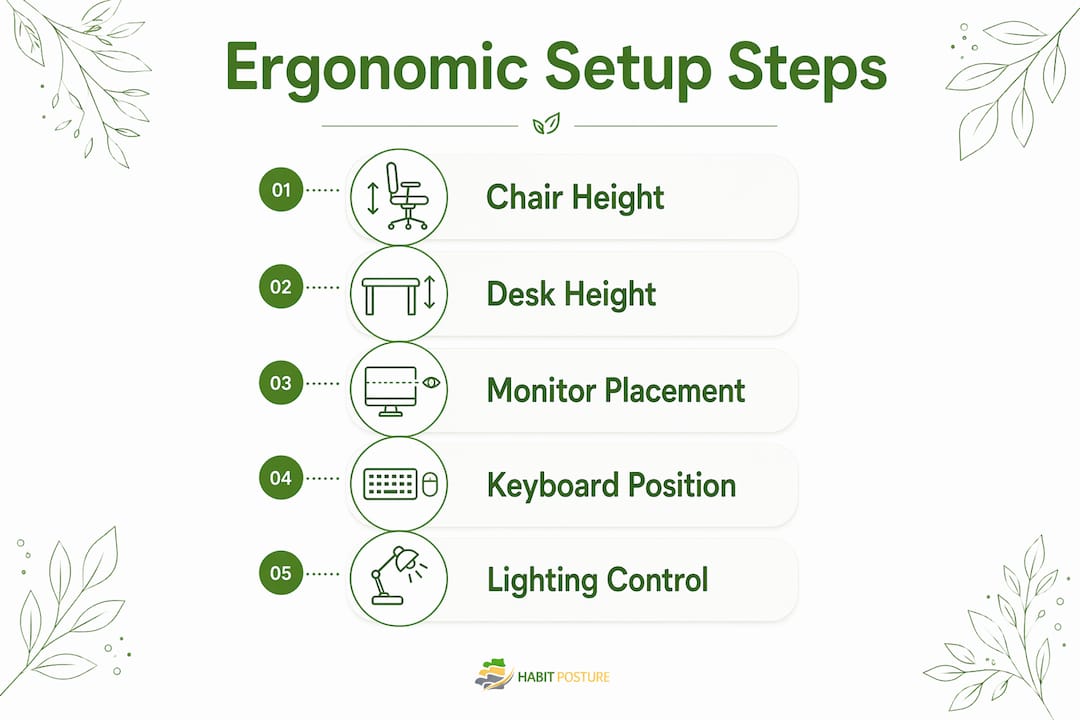
Proper ergonomic workstation setup with engineering controls produces more reliable and lasting posture improvement than stretch reminders or occasional breaks alone. That means getting your chair, desk, monitor, and keyboard physically right before relying on willpower or habit. Engineering your environment does the heavy lifting so your body does not have to.
Chair and spine alignment
Your chair height is correct when your feet rest flat on the floor and your knees sit at roughly a 90-degree angle. Lumbar support should contact the natural inward curve of your lower back, not push against your mid-back. A chair that forces you to perch forward or sink back destroys spinal alignment within minutes. For a detailed walkthrough, office chair adjustment examples cover the specific settings that keep your spine neutral through a full workday.
Desk height and monitor placement
Your desk height is correct when your forearms rest parallel to the floor with your shoulders relaxed. If your desk is too high, your shoulders shrug upward all day. If it is too low, you round forward to reach the keyboard. Your monitor should sit at arm’s length from your face, with the top of the screen at or just below eye level. That position keeps your head balanced over your spine rather than jutting forward.
Keyboard, mouse, and laptop setup
Laptop users face a specific problem: the screen and keyboard are physically linked, so raising the screen to eye level forces the keyboard too high, and lowering the keyboard drops the screen too low. The fix is an external keyboard and mouse paired with a laptop stand or monitor riser. That single change lets you position the screen at eye level while keeping your arms at a comfortable angle.
Here is a quick ergonomic setup checklist for a fluorescent office:
- Feet: flat on the floor or on a footrest, not dangling or tucked under the chair
- Knees: at approximately 90 degrees, with a small gap between the seat edge and the back of your knees
- Lumbar support: contacting the lower back curve, adjusted so you are not forced to slouch
- Monitor top: at or just below eye level, at arm’s length distance
- Keyboard and mouse: close to the body, elbows at roughly 90 degrees, wrists neutral
- Desk surface: clear of clutter that forces you to reach forward repeatedly
Pro Tip: Set a phone alarm for 2:00 PM specifically. That is when most office workers hit their postural low point. A 60-second standing reset at that time costs nothing and breaks the forward-lean cycle before it locks in.
What posture correction exercises work best for office workers?
Corrective exercises produce measurable reductions in forward head posture, shoulder rounding, and thoracic kyphosis. The evidence on pain relief is still developing, but the structural improvements in alignment are well documented. The key is targeting the right muscles.
Strengthening upper and mid-back muscles is the priority for correcting forward-leaning postures. Focusing only on chest and front shoulder muscles without balancing the back makes the imbalance worse. Standing rows, shoulder extensions, and thoracic extension over a foam roller are the three most effective moves for desk workers.
Here is a practical daily routine you can do without gym equipment:
- Standing rows (resistance band or cable): Pull your elbows back and squeeze your shoulder blades together. Do 3 sets of 12 reps. This directly counters the rounded-shoulder pattern that fluorescent office work reinforces.
- Shoulder blade squeezes: Sit tall, pull your shoulder blades toward each other and hold for 5 seconds. Repeat 10 times. Do this every hour at your desk.
- Chin tucks: Gently pull your chin straight back, creating a “double chin” position. Hold for 3 seconds. This resets forward head posture and relieves neck tension.
- Thoracic extension: Place a foam roller or rolled towel horizontally across your mid-back and gently extend over it. Hold for 20–30 seconds. This opens the thoracic spine that rounds forward during long screen sessions.
- Plank holds: A 20–30 second plank activates the deep core muscles that support spinal alignment from below. Two sets daily is enough.
The 20-20-20 rule serves double duty for office workers. Every 20 minutes, look at something 20 feet away for 20 seconds. That break reduces eye strain and also prompts a natural posture reset. When you look up and away, your head lifts, your shoulders drop, and your spine briefly returns to neutral.
Overcorrecting posture by pulling your shoulders too far back or arching your lower back creates new muscle strain. Neutral alignment is the goal, not military-straight rigidity. Imagine a string attached to the top of your head pulling gently upward. That mental cue produces the right amount of length without forcing an unnatural position.
Pro Tip: For posture improvement without gym equipment, resistance bands cost under $15 and handle standing rows and shoulder extensions at your desk. No commute to a gym required.
How do fluorescent lighting effects uniquely drive poor posture?
Flickering and glare from overhead fluorescent lights trigger subconscious squinting and forward head posture, loading the neck and shoulders with sustained tension. The critical word is “subconscious.” You do not decide to lean forward. Your visual system pulls you there without asking.
The mechanism is straightforward. When overhead light creates glare on your screen, your eyes work harder to distinguish text and images. Your head moves closer to the screen to compensate. Your shoulders follow. Over eight hours, that pattern becomes the default position your body returns to even when the glare is gone.
“Lighting forces influence posture reflexively. Adjusting your lighting is not an aesthetic choice. It is a direct intervention in your musculoskeletal health. The office workers who fix their lighting first make every other ergonomic adjustment more effective.”
Practical strategies that go beyond the standard ergonomic setup:
- Use indirect or uplighting where possible. Bouncing light off the ceiling diffuses it before it reaches your workspace, cutting flicker and direct glare at the source.
- Apply anti-glare screen filters. A physical matte filter on your monitor blocks ceiling reflections that a software brightness adjustment cannot fix.
- Take fluorescent-free breaks. Step outside or into a naturally lit space for 5 minutes every 90 minutes. Your visual system resets, and your posture follows.
- Request LED panel replacements. Modern LED panels produce stable, flicker-free light and are a direct upgrade from older fluorescent tube fixtures. Many facilities teams will accommodate the request.
Adaptation mismatch occurs when a brightly lit task area contrasts sharply with dim surroundings. Your eyes constantly shift between the two zones, causing fatigue that leads to compensatory forward leaning. Keeping ambient and task lighting balanced prevents this cycle from starting.
Key Takeaways
Posture improvement in a fluorescent office environment requires fixing your lighting first, then your workstation setup, and then building corrective movement habits in that order.
| Point | Details |
|---|---|
| Fix lighting before posture | Reduce glare and flicker first; every other ergonomic fix works better with balanced light. |
| Target 300–500 lux ambient | Stay within this range to cut eye fatigue and the forward lean it causes. |
| Engineering controls beat reminders | Physical chair and desk adjustments produce more lasting posture improvement than stretch breaks alone. |
| Strengthen the back, not just the front | Standing rows and shoulder extensions correct the muscle imbalance that drives forward head posture. |
| Use the 20-20-20 rule as a posture reset | Every 20 minutes, look away for 20 seconds. It reduces eye strain and resets spinal alignment simultaneously. |
What I’ve learned from watching office workers fight fluorescent light all day
Most people attack posture problems in the wrong order. They buy a lumbar cushion, watch a YouTube video about sitting up straight, and call it done. The lighting stays exactly as it was. Two weeks later, the neck pain is back and the cushion is under the desk.
The lighting environment is the hidden driver. I have watched workers with textbook ergonomic chairs still develop forward head posture because the fluorescent glare on their screens pulled them forward every single day. Fix the light source first. Position the monitor perpendicular to the window. Add a task lamp. Then adjust the chair. The sequence matters.
The other mistake I see constantly is overcorrection. Someone reads about posture, pulls their shoulders back as far as they can, and holds that position like a soldier. That creates upper-back tension within an hour and convinces them that “good posture hurts.” Neutral alignment is subtle. The string analogy works: imagine a gentle upward pull from the crown of your head. That is all it takes to find the right position.
Sustainable posture is a habit built in layers. Lighting, then workstation, then movement. Skip a layer and the whole structure is weaker. The connection between posture and workplace productivity is real, but it only shows up when you address all three layers consistently.
— Thomas
Habitposture gear built for the fluorescent office grind
Your neck starts aching around 2 PM. Your shoulders roll forward without you noticing. By 5 PM, you feel like you have been folded in a suitcase. That is the fluorescent office experience, and it is exactly what Habitposture was designed to address.
Habitposture builds wearable posture support for people who spend 8+ hours at a screen. No bulky medical braces. No guilt trips. Just practical gear that helps your body relearn neutral alignment while you work. Pair it with the ergonomic and lighting strategies in this article and the results compound fast. Check out the full range of posture support solutions and find the right fit for your workday. Posture is a habit. Habitposture helps you make it a good one.
FAQ
What lighting level is best for posture in an office?
Ambient office lighting at 300–500 lux reduces eye fatigue and the forward lean it causes. Tasks requiring high concentration benefit from 750 lux or more.
How does fluorescent light affect posture specifically?
Flickering and glare from fluorescent fixtures trigger subconscious squinting and forward head posture, loading the neck and shoulders with sustained muscle tension over the course of a workday.
What is the single most effective ergonomic fix for office posture?
Engineering controls, specifically chair height, lumbar support, and monitor placement, produce more lasting posture improvement than stretch reminders or occasional breaks alone.
What exercises correct forward head posture from screen work?
Standing rows, shoulder blade squeezes, chin tucks, and thoracic extension over a foam roller are the most effective moves for reversing the muscle imbalances that desk work creates.
Does the 20-20-20 rule help with posture as well as eye strain?
Yes. Every 20 minutes, looking at something 20 feet away for 20 seconds reduces eye strain and prompts a natural posture reset, briefly returning the head and shoulders to a neutral position.