Posture Habits for a Professional Work Environment
Posture habits in a professional work environment are defined as the consistent physical positioning and movement patterns you maintain during desk-based work, and they directly determine your musculoskeletal health, comfort, and focus across an eight-hour day. Most professionals don’t have a posture problem. They have a habit problem. The neck ache that hits at 2 PM, the shoulders that creep forward during a long Zoom call, the lower back that tightens by 4 PM — these are not random. They are the predictable result of unchecked sitting patterns compounded over months. The good news: ergonomic science, tools like adjustable chairs and laptop risers, and simple movement routines give you everything you need to fix them.
What are the best posture habits for a professional work environment?
Good posture at work is not about sitting rigidly upright. Occupational health experts define the goal as reducing prolonged awkward loading and encouraging postural variation rather than locking into one “perfect” position. That distinction matters because it shifts your focus from a static ideal to a dynamic habit, which is far more sustainable across a full workday.
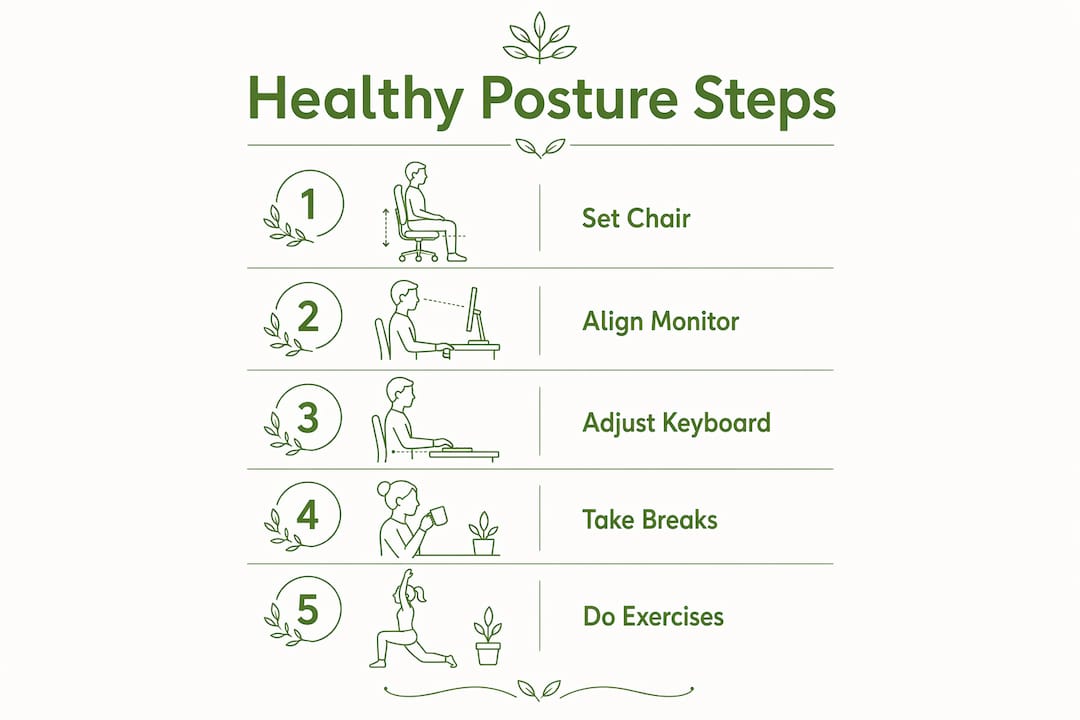
The foundation is a neutral body position. Key alignment cues include your head centered over your shoulders, elbows bent at 90 to 120 degrees, wrists straight, back supported by your chair’s lumbar region, and feet flat on the floor or on a footrest. These angles reduce the mechanical load on your spine, shoulders, and wrists simultaneously.

High-performance professionals treat this setup as a non-negotiable starting point, not a one-time configuration. The chair, monitor, keyboard, and lighting all interact. Getting one right while ignoring the others leaves real discomfort on the table.
How to set up your chair correctly
Start with chair height. Your feet should rest flat on the floor with your knees at approximately 90 degrees. Footrests are a practical fix if your feet don’t reach the floor after you’ve set the seat height to align your thighs parallel to the ground. Chairs with adjustable lumbar support, like the high back ergonomic chair from Habitposture, let you position the lumbar pad directly at the inward curve of your lower back, which is where most desk workers lose support first.
Unlock the chair’s tilt mechanism if it has one. Dynamic sitting with minor backrest movement reduces sustained spinal loading compared to sitting locked in one position all day. This is a small adjustment that most people never make, and it pays off significantly over a full week of desk work.
Monitor, keyboard, and lighting setup
Your monitor’s top edge should sit at or just below eye level, roughly an arm’s length away. This keeps your neck in a neutral position rather than tilted down toward a low screen. Keyboard and mouse placement should allow your elbows to stay close to your body at that 90 to 120 degree angle, with your wrists floating straight rather than bent upward or downward.
Lighting deserves attention too. Position your monitor perpendicular to windows to avoid glare, and use a desk lamp to supplement overhead lighting without creating screen reflections. Eye strain from poor lighting causes you to lean forward unconsciously, which is one of the fastest ways to break neutral neck posture.
Pro Tip: Set a recurring calendar reminder every four weeks to reassess your workstation setup. Setup drift is a documented failure mode where workers gradually revert to less ergonomic positions after training. A four-week check catches the drift before it becomes a pain pattern.
What role do movement and micro-breaks play in maintaining healthy posture?
Static posture, even a well-configured one, becomes a problem when held for too long. Regular micro-breaks at least once per hour significantly reduce musculoskeletal and eye strain symptoms while maintaining productivity. NIOSH and Cornell University research shows that even 30-second postural resets embedded within work blocks reduce discomfort and fatigue measurably.
The principle here is simple: your body is designed to move. Sitting still for 90 minutes, regardless of how well you’re positioned, increases spinal compression and reduces circulation to your lower limbs. Movement is not a productivity interruption. It is a productivity input.
Here is a practical micro-break framework you can apply today:
- Every 30 minutes, stand up and shift your weight. Walk to the printer, refill your water, or simply stand at your desk for two minutes.
- Every 60 minutes, take a 5-minute movement break. Walk a short loop, do shoulder rolls, or perform a standing back stretch.
- Every 90 minutes, step away from your screen entirely. Look at a distant object for 20 seconds to reset your eye muscles alongside your posture.
“Micro-breaks must interrupt visual, postural, and circulatory strain simultaneously to maximize ergonomic benefits without losing productivity.” — NIOSH and Cornell ergonomics research
Sit-stand desks add another layer of flexibility. The research is clear that alternating between sitting and standing every 30 to 60 minutes is optimal for comfort and circulation. Standing for extended periods without variation causes its own problems, including lower limb fatigue and back strain. The goal is alternation, not replacement.
What exercises and stretches help correct posture during work?
Exercise is the most underused tool in workplace posture correction. An eight-week integrated exercise program among desk workers improved posture, reduced musculoskeletal pain, and enhanced cognitive performance. The program included exercises performed every two hours, which produced significant improvements in both pain metrics and concentration. This is not a gym program. These are desk-side routines that take under five minutes.
The most effective movements target the muscle groups that desk work weakens most: the deep neck flexors, the thoracic extensors, the hip flexors, and the wrist extensors.
- Chin tucks: Pull your chin straight back to lengthen the back of your neck. Hold for five seconds, repeat ten times. This directly counters forward head posture.
- Thoracic extensions: Clasp your hands behind your head and gently arch your upper back over the top of your chair. Hold for three seconds. This reverses the thoracic rounding that builds up during screen time.
- Shoulder blade squeezes: Pull your shoulder blades together and down, hold for five seconds, release. Repeat ten times. This activates the mid-back muscles that go dormant during forward-reaching keyboard work.
- Wrist circles and extensions: Extend one arm forward, pull the fingers back gently with your other hand, hold for 15 seconds per side. Critical for anyone typing for more than four hours a day.
- Hip flexor stretch: Step one foot forward into a lunge position, lower your back knee toward the floor, and hold for 20 seconds per side. Prolonged sitting shortens the hip flexors, which tilts the pelvis forward and increases lower back strain.
Combining therapeutic, circulatory, and cognitive exercises produces multi-faceted benefits for desk workers, including better posture, less pain, and sharper concentration. The cognitive benefit is largely indirect: reduced physical discomfort means fewer distractions pulling your attention away from the task in front of you.
Pro Tip: Start with two exercises per break rather than attempting a full routine. Consistency over two weeks beats an ambitious program you abandon after three days. Add one new movement every week until the full routine feels automatic.
Common posture mistakes at work and how to fix them
Most desk workers make the same handful of errors. Recognizing yours is the first step toward correcting it.
- Slouching in the lower back: The lumbar curve collapses when you sit without back support. Fix: use a chair with adjustable lumbar support or add a lumbar cushion positioned at your lower back’s natural inward curve.
- Monitor too low: Laptops are the primary culprit. A fixed laptop screen forces you to tilt your head down, which loads the cervical spine with the equivalent of 40 to 60 pounds of force. Fix: laptop risers with external keyboards separate screen and input device heights, restoring neutral neck posture.
- Crossing your legs: This rotates the pelvis and creates uneven loading on the lumbar spine. Fix: feet flat on the floor or on a footrest, every time.
- Phone cradled between ear and shoulder: Even 10 minutes in this position strains the neck’s lateral muscles. Fix: use a headset or speakerphone for calls longer than two minutes.
| Mistake | Fix |
|---|---|
| Slouching lower back | Adjustable lumbar support chair or lumbar cushion |
| Laptop screen too low | Laptop riser plus external keyboard |
| Legs crossed | Feet flat on floor or footrest |
| Phone cradled on shoulder | Headset or speakerphone |
| Wrists bent at keyboard | Lower keyboard tray or wrist rest |
The deeper issue is that ergonomic knowledge alone does not prevent these mistakes from returning. Setup drift is real: ergonomics experts recommend follow-up workstation checks at four weeks and three months after any adjustment. Schedule those checks the same way you schedule a performance review.
Key takeaways
Building strong posture habits in a professional work environment requires combining an ergonomically configured workstation, consistent micro-break movement, and targeted exercises performed throughout the day.
| Point | Details |
|---|---|
| Neutral posture as a baseline | Set chair height, monitor level, and keyboard position to achieve neutral joint angles before anything else. |
| Dynamic sitting beats static | Unlock your chair’s tilt and shift positions regularly to reduce sustained spinal loading. |
| Micro-breaks are non-negotiable | A 30-second postural reset every hour measurably reduces musculoskeletal strain and maintains focus. |
| Exercises accelerate correction | An eight-week desk-side exercise routine improves posture, reduces pain, and sharpens concentration. |
| Reassess every four weeks | Setup drift returns bad habits silently. Scheduled workstation checks are the only reliable defense. |
What I’ve learned after years of watching professionals ignore their posture
Most professionals I’ve spoken with treat posture as a comfort issue, something to address when the pain gets bad enough. That framing is the core mistake. By the time pain is noticeable, the habit has been reinforced for months. The musculoskeletal system is patient. It absorbs poor loading patterns quietly until it can’t.
The professionals who genuinely fix their posture habits share one trait: they treat the workstation setup as a system, not a checklist. They adjust the chair, then check how the monitor height responds to that change, then verify the keyboard position, then reassess after a week. It’s iterative, not one-and-done.
The other thing most articles won’t tell you is that your employer has a role here too. In most jurisdictions, employers are required to provide ergonomic assessments for desk-based workers. If you haven’t asked for one, ask. A 30-minute assessment from an occupational health professional can identify setup errors that you’ve been living with for years without realizing they’re the source of your afternoon neck ache.
The posture correctors and ergonomic gear from Habitposture are tools I’d recommend not as a replacement for good habits, but as a physical reminder that keeps your body honest while the habits are still forming. The adjustable posture corrector works on exactly that principle. Wear it while the habit is being built. Eventually, you won’t need it.
— Thomas
Build better posture habits with Habitposture
If you’ve read this far, you already know that fixing your posture at work is about more than sitting up straight. It’s about the right chair, the right setup, and the right support while your body relearns what good alignment feels like.
Habitposture builds gear for people who spend eight-plus hours at a screen and need real solutions, not lectures. The ergonomic high back office chair with flip-up arms gives you the lumbar support and adjustability your current chair probably lacks. Pair it with the adjustable posture corrector for the first few weeks while your body adapts. Browse the full range at Habitposture and find the setup that fits your workday.
FAQ
What are posture habits in a professional work environment?
Posture habits in a professional work environment are the consistent physical positioning and movement patterns you maintain during desk-based work. They include chair setup, monitor height, break frequency, and movement routines that collectively determine your musculoskeletal health and comfort.
How often should you take breaks to protect your posture at work?
Micro-breaks at least once per hour significantly reduce musculoskeletal strain and eye fatigue. Even a 30-second postural reset within a work block produces measurable reductions in discomfort.
What is setup drift and why does it matter?
Setup drift is the documented tendency for workers to revert to less ergonomic positions over weeks after a workstation adjustment or training session. Ergonomics experts recommend scheduled workstation reassessments at four weeks and three months to catch and correct drift before it causes pain.
Do ergonomic chairs actually make a difference?
Yes. Chairs with adjustable lumbar support, seat height, and tilt mechanisms allow you to maintain neutral spinal alignment and encourage dynamic sitting, which reduces sustained spinal loading compared to fixed-position seating.
Can exercises at your desk really improve posture?
An eight-week desk-side exercise program produced significant improvements in posture, musculoskeletal pain, and cognitive performance among desk workers. Exercises performed every two hours, including neck, back, and shoulder movements, deliver results without requiring gym time.