Posture Brace Wearing Work Calls: Your Practical Guide
Wearing a posture brace during work calls is one of the most effective ways to maintain spinal alignment and reduce shoulder discomfort during long screen sessions. Posture braces, also called posture correctors, work by providing gentle compression and a physical cue that pulls your shoulders back and supports your upper spine. About 1 in 3 workplace injuries are musculoskeletal disorders linked to poor desk setup. That number alone makes a strong case for adding structured posture support to your daily work routine. This guide covers how to choose, wear, and integrate a posture brace with your professional setup so you actually feel the difference by end of day.
How to choose the best posture brace for work calls
Choosing the right brace starts with fit, not features. A brace that pinches your armpits or bunches under your shirt will distract you on every call. Proper sizing requires measuring your chest circumference before buying, especially for women, since incorrect sizing is the most common reason braces fail to deliver results.
When shopping for a brace you can wear with professional attire, look for these features:
- Seamless construction: Flat seams prevent visible lines under fitted shirts or blouses.
- Neutral tones: Beige, black, or gray tones stay hidden under light-colored tops.
- Breathable fabric: Mesh panels or moisture-wicking blends prevent overheating during long calls.
- Adjustable straps: Dual-strap designs let you fine-tune tension across each shoulder independently.
- Lightweight profile: Thin, low-profile braces sit flat against your back without creating bulk.
Most posture braces for desk workers target the upper back and shoulders, which is exactly where forward head posture and rounded shoulders develop during prolonged sitting. Modern posture-correcting undergarments with seamless design and neutral tones fit discreetly under professional attire and support confidence during video calls. That matters more than most people realize. Feeling put-together on camera affects how you present yourself.
Pro Tip: Measure your chest circumference in inches before ordering. If you fall between sizes, size up. A slightly looser fit is easier to adjust than one that digs into your underarms from the start.

How to wear and adjust a posture brace during long calls
Putting on a posture brace correctly takes about 60 seconds. Doing it wrong leads to discomfort within the first 15 minutes, which is why most people quit too early.
Follow these steps every time:
- Loosen all straps fully before putting the brace on. Never try to slip into a pre-tightened brace.
- Position the back panel centered on your upper spine, between your shoulder blades.
- Thread your arms through the loops so each strap sits in the groove of your shoulder, not on your neck.
- Tighten gradually from the back panel outward. You want a firm, snug feel, not a squeeze.
- Take a full breath. Your chest should expand without restriction. If it does not, loosen the straps slightly.
- Sit in your normal work position and check that your shoulders sit back naturally without forcing them.
Health professionals recommend starting with 15–30 minute sessions once or twice daily, then building up to a maximum of 3 hours total per day. That progression matters because your postural muscles need time to adapt. Jumping straight to all-day wear weakens the muscles you are trying to train.
Pro Tip: Set a phone timer when you put the brace on. When it goes off, remove the brace and sit without it for at least 10 minutes. This forces your muscles to hold the position independently, which is the actual goal.
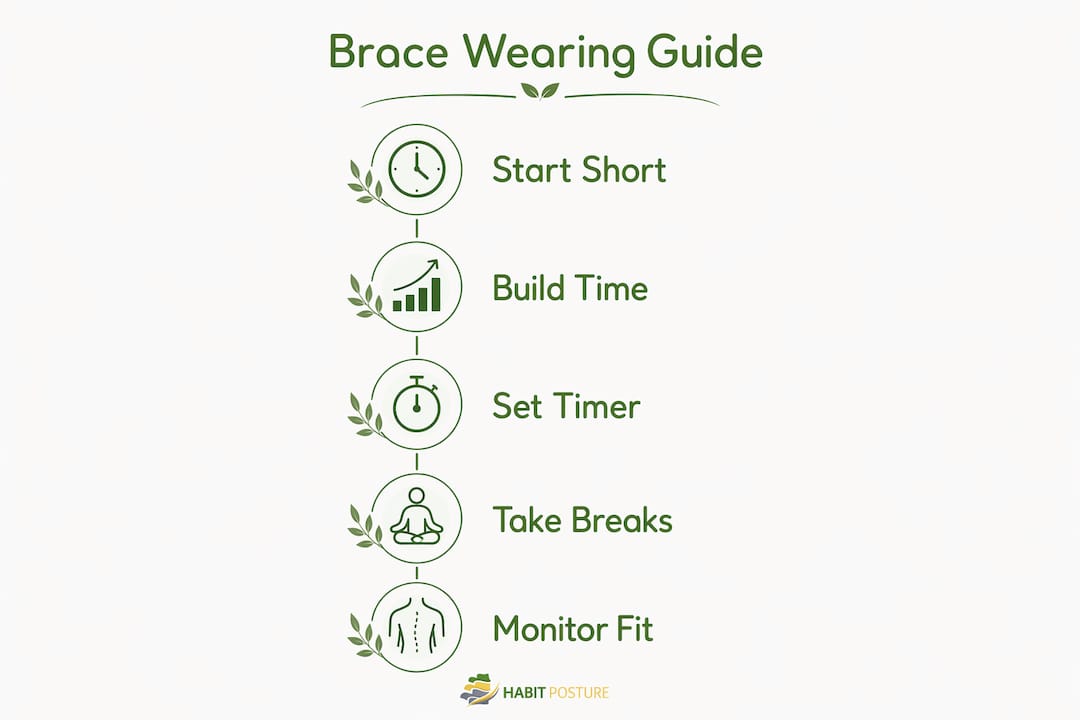
Remove the brace immediately if you feel tingling, numbness, or restricted breathing. Those are signs the fit is wrong or the straps are too tight.
Do posture braces work better with ergonomic workstation adjustments?
Yes, and the combination is significantly more effective than either approach alone. Ergonomic workstation setup elements including screen height, lumbar support, and keyboard placement form the foundation of posture improvement. A brace worn at a poorly configured desk fights against the environment you spend 8 hours in.
Here is what your workstation setup should include:
- Screen height: Top of your monitor at or just below eye level to prevent forward head tilt.
- Chair lumbar support: Lower back should contact the chair’s lumbar curve, not float away from it.
- Keyboard placement: Elbows at roughly 90 degrees, wrists neutral, not bent upward.
- Feet flat on the floor: Avoid crossing your legs, which rotates the pelvis and stresses the lower back.
Ergonomic guidelines recommend micro-breaks every 45–60 minutes to stand, stretch, and reset your posture. The 20-20-20 rule also applies: every 20 minutes, look at something 20 feet away for 20 seconds to reduce eye strain and encourage a natural posture reset. These breaks matter even more when you are wearing a brace, because static sitting for hours at a time increases spinal load regardless of support.
Pro Tip: Pair your movement breaks with a quick shoulder roll and chest opener. Stand up, clasp your hands behind your back, and gently lift your chest. Ten seconds of this resets your posture better than any passive device can.
Ergonomists view posture as a habit and movement pattern rather than a static position. No device alone compensates for prolonged static sitting. The brace is a cue. Your workstation setup and movement habits are the system.
Common mistakes when using a posture brace at your desk
The biggest mistake is treating a posture brace like a passive fix you wear all day and forget about. Wearing a brace all day reduces muscle activity, causing fatigue and dependency. Your postural muscles stop firing because the brace is doing the work for them.
Watch for these common errors:
- Wearing it too long: More than 3 hours daily without breaks leads to muscle atrophy, not improvement.
- Over-tightening the straps: Restricted breathing and numbness in the arms are warning signs you have gone too far.
- Ignoring your workstation: A brace cannot fix a screen that sits too low or a chair with no lumbar support.
- Buying the wrong size: A brace that gaps at the back or digs into the armpits is not providing the right correction.
- Skipping movement breaks: Sitting still in a brace for hours defeats the purpose of wearing one.
“Posture braces act as awareness cues by limiting motion gently and providing compression, improving alignment short term. They cannot replace muscle capacity and movement training. Braces change the forces on the trunk, but lasting results require active rehabilitation alongside brace use.”
Persistent pain, numbness, weakness, or worsening symptoms are signals to stop using the brace and consult a healthcare professional. Posture braces do not address underlying medical conditions and can mask serious issues if used without professional guidance. If your symptoms do not improve after two to three weeks of correct use, book an appointment with a physical therapist.
Physical therapists recommend pairing brace use with upper back and trunk strength training. Exercises like rows, face pulls, and scapular retractions build the muscle endurance that keeps you upright long after you take the brace off.
Key Takeaways
A posture brace works best as a short-term alignment cue combined with ergonomic workstation setup, regular movement breaks, and targeted muscle strengthening for lasting posture improvement.
| Point | Details |
|---|---|
| Start with short sessions | Begin with 15–30 minutes daily and build up gradually to avoid muscle dependency. |
| Size before you buy | Measure chest circumference to prevent armpit pinching and ensure discreet wear under work clothes. |
| Fix your workstation too | Screen height, lumbar support, and keyboard placement must complement brace use for real results. |
| Move every 45–60 minutes | Micro-breaks reset posture and prevent the static sitting risks a brace cannot address. |
| Stop if symptoms worsen | Numbness, tingling, or persistent pain means stop using the brace and see a professional. |
What I have learned from watching people use posture braces at work
Most people who try a posture brace give up within two weeks. Not because the brace does not work. Because they expected it to do everything.
I have seen remote workers strap on a brace, sit in the same hunched position for four hours, and then wonder why their neck still hurts. The brace is a cue, not a cure. It reminds your body where it should be. Your muscles still have to do the work of getting there and staying there.
The approach that actually produces results is boring but consistent. Short sessions. Workstation adjustments. Movement breaks. Strength work. Repeat for six to eight weeks. That is when people start noticing they sit better even without the brace on. That is the goal. The brace is training wheels, not a permanent fixture.
One thing I would push back on is the idea that posture correction requires expensive equipment or complicated programs. A well-fitted brace worn for 20 minutes during your morning calls, combined with a standing break routine every hour, produces measurable change. The people who see results are not the ones with the fanciest setup. They are the ones who show up consistently with a simple system.
If your symptoms persist beyond a few weeks of correct use, see a physical therapist. A brace is a starting point, not a diagnosis.
— Thomas
Posture support built for real work days
Long calls, back-to-back meetings, and hours at a screen take a real toll on your body. Habitposture builds posture support gear for people who live that reality every day.
Our braces are designed to wear discreetly under professional attire, with breathable materials and adjustable straps that fit your body, not a generic template. Pair them with the posture habits guide on our site to build a routine that actually sticks. Whether you are on your fifth Zoom call of the day or grinding through a spreadsheet at 9 PM, Habitposture has the support you need. Visit habitposture.com to find the right fit for your work day.
FAQ
How long should you wear a posture brace during work calls?
Start with 15–30 minute sessions once or twice daily and build up to a maximum of 3 hours total per day. Wearing a brace longer than recommended reduces muscle activity and creates dependency rather than improvement.
Can you wear a posture brace under professional attire on video calls?
Yes. Braces with seamless construction and neutral tones sit flat under fitted shirts and blouses without visible lines or bulk. Measure your chest circumference before buying to get a fit that stays hidden throughout the day.
Do posture braces actually fix poor posture?
Posture braces improve alignment short term by acting as a physical cue, but they cannot replace muscle strength or movement habits. Lasting posture improvement requires pairing brace use with ergonomic workstation setup and regular movement breaks.
What are the signs a posture brace fits incorrectly?
Armpit pinching, restricted breathing, numbness in the arms, or a brace that gaps away from your back all indicate a poor fit. Remeasure your chest circumference and adjust sizing before continuing use.
When should you stop using a posture brace?
Stop immediately if you experience persistent pain, numbness, weakness, or worsening symptoms, and consult a healthcare professional. Posture braces do not address underlying medical conditions and should never be used to mask serious issues.