Posture and Workplace Productivity: Your 2026 Guide
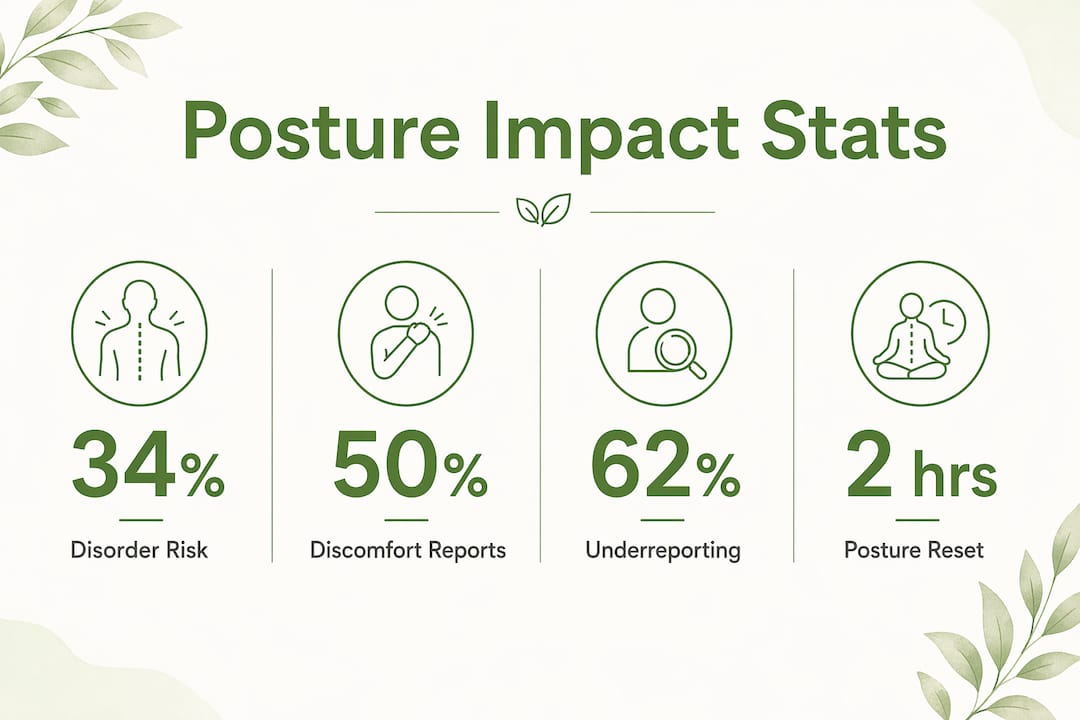
Poor posture is defined as a sustained misalignment of the spine and joints that directly reduces workplace productivity by increasing physical pain and degrading cognitive focus. The role of posture in workplace productivity goes far beyond sitting up straight. Research shows that poor posture raises the risk of musculoskeletal disorders by 34%, and those disorders translate directly into missed focus, slower output, and more sick days. Tools like RULA (Rapid Upper Limb Assessment) and interventions like sit-stand desks are now central to how ergonomists measure and fix these problems. If you spend eight or more hours at a screen, your posture is either working for you or against you.
How does poor posture affect workplace productivity and health?
Poor posture creates a cascade of physical problems that make focused work harder. Back pain, neck stiffness, and eye strain are not minor inconveniences. They pull mental resources away from the task in front of you, forcing your brain to manage discomfort instead of doing actual work.
A 2026 mixed-methods study of 70 government administrative employees found that 50% reported mild discomfort tied directly to poor lumbar support and inadequate desk setups. That figure represents half a workforce operating below capacity every single day. The same research identified specific ergonomic risk factors using RULA scoring, linking awkward neck angles and unsupported lower backs to measurable productivity losses.
The cognitive toll is just as real as the physical one. When your body is out of alignment, your nervous system spends energy maintaining balance rather than supporting concentration. Mental fatigue sets in earlier, decision quality drops, and tasks that should take 20 minutes stretch to 40. This is the hidden cost of poor posture that most productivity conversations ignore.
Here are the most common discomfort issues reported by desk workers:
- Back and lumbar pain from unsupported spinal curvature during prolonged sitting
- Neck and upper-back tension from forward head posture while viewing screens
- Eye strain and headaches caused by screen distance misalignment linked to slouching
- Wrist and shoulder fatigue from desk heights that force unnatural arm angles
- General mental fatigue from the sustained effort of compensating for physical discomfort
One more problem compounds all of these: underreporting. Despite the discomfort, over 62% of workers believe ergonomic setups significantly improve productivity, yet many never report their pain to management. That silence means problems go unfixed, and the productivity drain continues invisibly.
What ergonomic interventions and exercises actually improve productivity?
The good news is that targeted interventions work. A 2026 desk-worker study found that an eight-week integrated exercise program combining cognitive, circulatory, and therapeutic movements improved posture, reduced pain, and enhanced concentration in participants. That is a meaningful result because it links physical correction directly to mental performance gains.
The most effective approach combines workstation modifications with a structured movement routine. Here is a practical sequence to follow:
- Adjust your workstation first. Set your monitor at eye level, position your keyboard so your elbows rest at 90 degrees, and add lumbar support to your chair. These changes reduce the baseline strain your body fights all day.
- Add a sit-stand desk or converter. Alternating between sitting and standing reduces sustained spinal load and keeps circulation active. Research confirms this approach cuts neck and upper-back pain short-term.
- Schedule micro-exercise sessions every two hours. Progressive, frequent micro-exercise sessions scheduled every two hours over multiple weeks produce greater posture and concentration improvements than less frequent routines.
- Include targeted movements. Chin tucks, shoulder blade squeezes, thoracic extensions over a chair back, and hip flexor stretches directly counteract the muscle imbalances that desk work creates.
- Track progress over weeks, not days. Posture correction is cumulative. Expect noticeable comfort improvements within two to four weeks of consistent practice.
A systematic PRISMA review of ergonomic interventions confirmed that combined approaches, meaning both physical corrections and behavioral changes, yield better short-term results than either strategy alone. The review also noted that long-term benefits require continuous practice. Stopping the routine reverses the gains.
Pro Tip: Set a two-hour phone alarm labeled “posture reset.” Stand up, do five shoulder rolls, one thoracic extension, and a 30-second standing hip flexor stretch. That four-minute routine, repeated consistently, compounds into real structural change over weeks.

How does posture relate to cognitive focus during work?
The relationship between posture and mental focus is more dynamic than most people realize. Workers do not switch postures on a fixed schedule. They switch based on what their brain needs at that moment.
A three-week observational study with knowledge workers using sit-stand desks found that participants stood more often when focusing on demanding tasks than during scheduled break reminders. This tells us something important: posture and cognitive state are linked in real time, not just in theory. Standing becomes a tool for attention, not just a health habit.
“Workers stand when they want to focus rather than at scheduled intervals, indicating posture and productivity are connected cognitively.” — Context-aware sit-stand desk interventions, 2026
This finding has direct implications for how you set up your workspace. Generic timed reminders to stand or stretch can actually interrupt deep work rather than support it. Ergonomic reminders aligned with natural cognitive workflow produce better posture switching without disrupting productivity. The practical takeaway is to design your posture habits around your task transitions, not a clock.
If you move from a focused writing block to a meeting, that transition is the natural moment to stand, stretch, and reset. If you are mid-flow on a complex problem, forcing a posture break at the 30-minute mark may cost you more than it saves. Personalized ergonomic prompts that read your workflow beat one-size-fits-all reminders every time.
How to set up your workstation for better posture and output
Getting your physical setup right is the foundation. No amount of exercise or awareness compensates for a workstation that forces your body into bad positions for eight hours straight.
Start with these non-negotiables for correct posture in office work:
- Chair height: Feet flat on the floor, knees at 90 degrees, thighs parallel to the ground
- Lumbar support: The curve of your lower back should be supported, not hanging free. A lumbar-supportive ergonomic chair removes the constant muscular effort of holding your spine upright
- Screen position: Top of the monitor at or just below eye level, about an arm’s length away
- Keyboard and mouse: Close enough that your shoulders stay relaxed, not reaching forward
- Lighting: Positioned to eliminate screen glare, which forces compensatory head tilting
Beyond the basics, active seating options add another layer of benefit. A 2025 study on 360-degree swaying chairs found that using one in a specific posture maintains spinal curvature and reduces upper-body muscle load compared to standard chairs. Active chairs engage your core subtly throughout the day, preventing the deep slouch that sets in after hour three of sedentary work.
| Setup element | Standard option | Upgraded option |
|---|---|---|
| Seating | Basic office chair | Ergonomic chair with lumbar support |
| Desk | Fixed-height desk | Sit-stand desk or converter |
| Chair type | Static seat | 360° swaying or active chair |
| Posture aid | None | Adjustable posture corrector for retraining |
| Reminders | Timed app alerts | Task-transition-based prompts |
Remote workers face a specific challenge here. Home setups often lack the ergonomic infrastructure of a proper office, and the impact of posture on productivity compounds when your environment is already less structured. Investing in one quality ergonomic chair and a monitor riser delivers more return than any productivity app.
Pro Tip: If you work from a laptop, a separate keyboard and an external monitor are the two highest-impact purchases you can make for your posture. Laptop screens force your head down and your shoulders forward. Raising the screen to eye level and using a separate keyboard fixes both problems at once.
Key takeaways
Posture directly shapes workplace productivity by determining both physical comfort and cognitive capacity, and improving it requires combining ergonomic setup changes with consistent movement habits.
| Point | Details |
|---|---|
| Poor posture raises disorder risk | Musculoskeletal disorder risk increases by 34%, reducing focus and output. |
| Exercise programs deliver real gains | An eight-week routine improved posture, reduced pain, and enhanced concentration in desk workers. |
| Posture and focus are cognitively linked | Workers stand to focus, not just to rest, so design habits around task transitions. |
| Combined interventions work best | Pairing workstation adjustments with movement routines outperforms either approach alone. |
| Continuous practice sustains results | Short-term ergonomic gains reverse without ongoing effort and habit reinforcement. |
Why I think most posture advice misses the point entirely
Most posture content tells you to sit up straight and buy a better chair. That is not wrong, but it treats posture as a static problem with a static solution. After spending years looking at how professionals actually work, the more interesting insight is that posture is a cognitive signal, not just a physical one.
The sit-stand desk research changes how I think about this. When workers stand to focus rather than to follow a reminder, it means their body and brain are already communicating about what they need. The job is not to override that with a rigid schedule. It is to build an environment where your natural instincts lead to better positions.
I have also seen too many people invest in expensive ergonomic chairs and then sit in them just as badly as they sat in their old ones. Equipment matters, but habit formation matters more. A quality ergonomic chair with flip-up arms gives your body the right support structure. What you do with that structure over the next 90 days determines whether it actually changes anything.
The future of workplace ergonomics is personalization. Context-aware prompts, posture-sensing wearables, and workstation designs that adapt to cognitive states are already emerging. But the professionals who will benefit most are the ones who have already built the baseline habit of noticing their posture and responding to it. Technology amplifies good habits. It cannot create them from scratch.
— Thomas
How Habitposture supports your posture at work
Habitposture builds gear for people who live at their desks, not for people who visit them occasionally. Whether you are on your fifth Zoom call of the day or grinding through a deadline at midnight, your body deserves support that works without demanding your attention.
The Habitposture lineup includes ergonomic chairs with built-in lumbar support, posture correctors designed for all-day wear, and recovery tools that address the muscle tension that builds up over a long session. Every product is built around one idea: posture is a habit, and the right gear makes that habit easier to keep. Visit Habitposture to find the setup that fits your work life, not just your office.
FAQ
How does posture directly affect work performance?
Poor posture increases musculoskeletal disorder risk by 34% and forces the brain to manage physical discomfort instead of focusing on tasks, reducing both speed and quality of output.
What is the fastest way to improve posture for desk workers?
Combining a workstation adjustment (lumbar support, monitor at eye level) with micro-exercise sessions every two hours produces measurable improvements in comfort and concentration within weeks.
Should I use a sit-stand desk to improve productivity?
Yes. Research shows sit-stand desk users naturally stand more during cognitively demanding tasks, and alternating positions reduces neck and upper-back pain that degrades focus over a workday.
How does posture relate to confidence in the workplace?
Upright posture signals engagement and authority in professional settings, including job interviews. The role of posture in confidence at work is well-documented: open, aligned body positions correlate with higher perceived competence and self-assurance.
Do ergonomic chairs actually make a difference?
A quality ergonomic chair with proper lumbar support removes the constant muscular effort of holding your spine upright, reducing fatigue and discomfort. The benefit compounds over a full workday compared to unsupported seating.