Posture and Remote Work Productivity: 2026 Guide
Good posture is defined as spinal alignment that keeps your muscles, joints, and nerves working without unnecessary strain. For remote workers, that alignment directly determines how sharp, energized, and pain-free you feel by 3:00 PM. Over 80% of remote workers experience musculoskeletal discomfort, and forward head posture affects nearly 83% of desk workers, with remote workers showing a 15% higher prevalence than their office counterparts. The connection between posture and remote work productivity is not a wellness trend. It is a measurable performance variable you can control.
How does poor posture develop in remote work environments?
Remote workers sit an average of 7.8 hours per day, roughly one hour more than office workers. That extra hour compounds fast when your chair is a dining seat, your screen is a laptop balanced on a coffee table, and no one is walking past your desk to remind you to sit up.
The most common result is forward head posture, a condition clinicians also call “postural syndrome” in remote workers. Each inch of forward head displacement adds approximately 10 pounds of mechanical load on your neck muscles and cervical spine. Most people drift 2–3 inches forward without noticing. That is 20–30 extra pounds your neck carries all day.

Laptop design makes this worse by default. The screen and keyboard share one unit, so you either hunch toward the screen or drop your gaze to a low keyboard. Neither position is neutral. Both create the kind of static load that fatigues muscles within minutes, not hours.
Here is what typically drives posture collapse in a home office:
- No ergonomic defaults. Home furniture is designed for relaxation, not sustained work.
- Unbroken sitting blocks. Without colleagues or commutes, remote workers rarely stand between 9:00 AM and noon.
- Laptop-only setups. No external keyboard or raised screen means constant neck flexion.
- Psychological stress. High mental stress increases the risk of worsened musculoskeletal symptoms by 15 times, creating a feedback loop where tension tightens muscles and pain raises stress.
- Poor lighting. Dim or glare-heavy screens pull you forward as your eyes strain to focus.
Pro Tip: Set a phone alarm for every 30 minutes. When it goes off, check whether your ears are stacked over your shoulders. That single awareness habit catches most forward drift before it becomes pain.
What ergonomic setups and habits improve posture for remote workers?
The most impactful single change for laptop users is raising the screen to eye level and adding an external keyboard and mouse. This breaks the ergonomic compromise built into every laptop and lets your neck stay neutral while your arms rest at elbow height. A $30 laptop stand plus a basic wireless keyboard delivers this fix immediately.
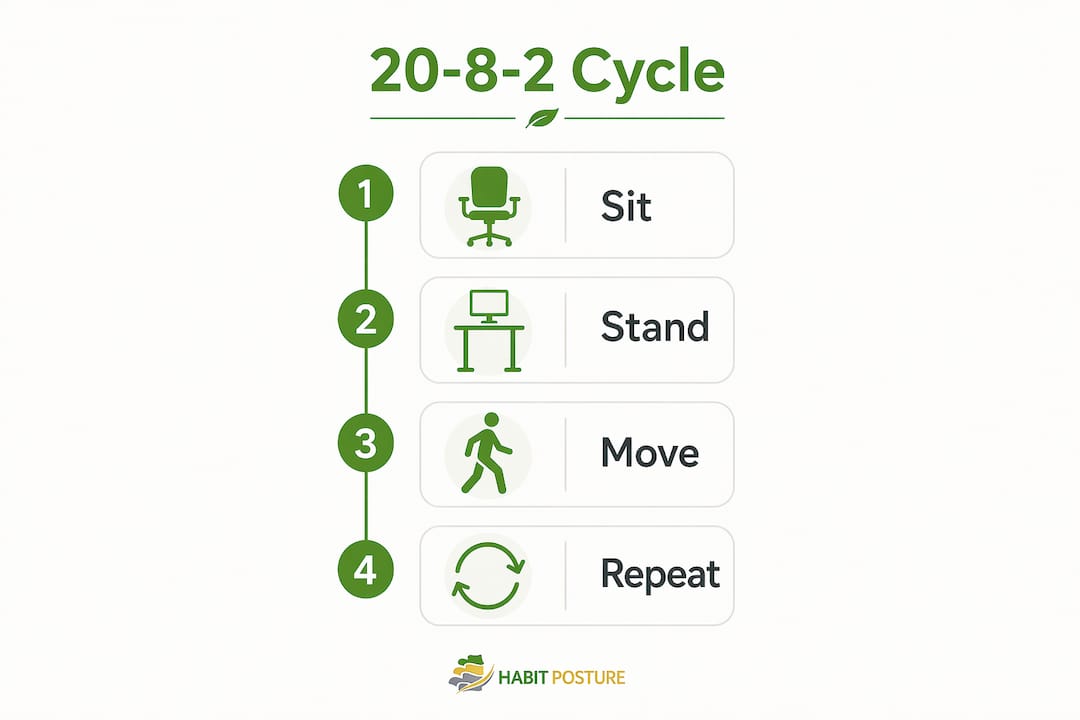
Beyond the screen, the 20-8-2 rule is the most research-supported movement cycle for desk workers. The pattern works like this:
- Sit for 20 minutes with lumbar support engaged and feet flat on the floor.
- Stand for 8 minutes at a raised surface or standing desk converter.
- Move for 2 minutes by walking, stretching, or doing light mobility work.
The 20-8-2 cycle repeated every 30 minutes maximizes blood flow, reduces spinal compression, and prevents the fatigue that builds from holding any single position too long. Even “good” posture becomes a problem when it is static for hours.
Chair setup matters just as much as the cycle. Your chair height should place your thighs parallel to the floor with feet flat. A lumbar roll or rolled towel behind your lower back restores the natural inward curve of the lumbar spine that most chairs flatten. A footrest helps shorter workers maintain this alignment without perching on the edge of the seat.
Lighting is an underrated posture driver. A screen that is too dim or positioned against a bright window forces you to lean in. Position your monitor perpendicular to windows and keep ambient light roughly equal to screen brightness. That one adjustment reduces the forward pull that starts eye strain and ends as neck pain.
Pro Tip: Before spending money on a standing desk, try a $15 monitor riser and a $25 wireless keyboard. Most remote workers see a significant posture improvement from these two changes alone before investing in larger ergonomic equipment.
| Setup element | Low-cost fix | Upgraded option |
|---|---|---|
| Screen height | Laptop stand or stacked books | Adjustable monitor arm |
| Keyboard position | Wireless keyboard on desk | Ergonomic split keyboard |
| Lumbar support | Rolled towel or small pillow | Adjustable lumbar chair |
| Movement reminder | Phone timer every 30 minutes | Wearable posture tracker |
Which exercises and movement strategies support posture during remote work?
Dynamic sitting, meaning frequent position changes rather than holding one perfect pose, reduces discomfort and boosts productivity more effectively than rigid posture maintenance. The goal is not stillness. The goal is variety.
These short routines take under three minutes and fit between tasks:
- Chest opener. Clasp hands behind your back, squeeze shoulder blades together, and hold for 10 seconds. Repeat three times. This directly counteracts the rounded shoulder position that builds during typing.
- Neck half-circles. Drop your right ear toward your right shoulder, roll your chin to your chest, then to the left. Move slowly. Do three rotations each direction. This releases the cervical tension that forward head posture creates.
- Hip flexor stretch. Step one foot forward into a lunge, drop the back knee to the floor, and press your hips forward gently. Hold 20 seconds per side. Sitting shortens hip flexors, which tilts the pelvis and flattens lumbar curve.
- Thoracic extension. Place a rolled towel horizontally across your mid-back and lean back over it gently. This reverses the thoracic flexion that hours of typing creates.
Micro-breaks with posture resets every 30 minutes improve musculoskeletal health and cognitive alertness in remote workers. The break does not need to be long. Two minutes of movement resets blood flow and muscle activation more effectively than ten minutes of stretching done once at lunch.
Stress management belongs in this section too. Psychological stress raises the risk of worsened posture-related pain by 15 times. A two-minute breathing exercise, box breathing (four counts in, four hold, four out, four hold), lowers cortisol and physically relaxes the muscle tension that pulls your shoulders toward your ears. Treating stress as a posture habit, not just a mental health practice, changes how you approach both.
Pro Tip: Use a free browser extension like a tab timer or a simple kitchen timer to trigger movement breaks. Posture accountability in remote work does not require an app subscription. It requires a consistent cue.
What is the ROI of investing in ergonomic home office solutions?
The financial case for ergonomics is direct. An $800 per person investment in ergonomic equipment pays itself off within 8–14 months through reduced absenteeism and measurable productivity gains. That math works even for solo remote workers who bear the cost themselves, because the alternative is lost work hours, medical appointments, and chronic pain that compounds over years.
Slouching compresses the diaphragm and reduces lung capacity by up to 30%. Less oxygen reaches the brain, and cognitive performance drops. That is the real reason your thinking feels foggy after a long afternoon at a poorly set-up desk. It is not just tiredness. It is reduced oxygenation caused by posture collapse.
“The afternoon slump most remote workers blame on circadian rhythm is largely driven by postural collapse reducing oxygen to the brain. Fix the posture, and the slump shrinks.”
Ergonomic improvements also reduce the risk of musculoskeletal disorders, which are the leading cause of workplace disability claims. Better ergonomic equipment reduces these claims and keeps remote workers performing consistently across the full workday, not just the morning hours.
Start with the highest-impact, lowest-cost changes first. Raise your screen, add an external keyboard, and set a movement timer. Then layer in a quality chair, lumbar support, and a footrest. Reserve standing desks and monitor arms for a second phase once the behavioral habits are in place. Spending on gear before building the habits produces expensive furniture that gets used the same way as the cheap stuff.
Key takeaways
Good posture directly improves remote work productivity by reducing musculoskeletal pain, increasing oxygen to the brain, and preventing the fatigue that kills focus by midafternoon.
| Point | Details |
|---|---|
| Posture affects cognition | Slouching reduces lung capacity by up to 30%, cutting oxygen to the brain and impairing focus. |
| Remote workers sit more | At 7.8 hours per day, remote workers sit one hour longer than office workers, increasing static posture risk. |
| The 20-8-2 rule works | Cycling 20 minutes sitting, 8 standing, and 2 moving every 30 minutes reduces fatigue and spinal compression. |
| Ergonomics pays off | An $800 ergonomic investment returns value within 8–14 months through fewer sick days and better output. |
| Stress worsens posture pain | High psychological stress raises the risk of musculoskeletal symptoms by 15 times, making stress management a posture habit. |
What I’ve learned after years of watching remote workers fight their own bodies
Most remote workers treat posture as a static target. They read that they should sit up straight, try it for a day, feel uncomfortable, and give up. That is the wrong mental model entirely.
Posture is a moving practice. The body is not designed to hold any single position for hours, even a perfect one. What actually works is building a rhythm of small corrections throughout the day. A posture check when you open a new browser tab. A chest stretch when you finish a call. A two-minute walk when you hit send on an email. None of these feel like “posture work.” Together, they are the whole system.
The other trap I see constantly is waiting until pain appears before acting. By the time your neck aches at 2:00 PM, you have already spent six hours loading the same muscles in the same wrong direction. Pain is a lagging indicator. The habits that protect your posture need to run before the pain shows up, not in response to it.
Start with one change this week. Raise your screen. Set a 30-minute timer. Do one chest opener between meetings. Layer the next change the week after. That approach sticks. Overhauling your entire setup in one weekend rarely does.
— Thomas
Habitposture: built for the way you actually work
If you spend eight or more hours a day in front of a screen, your posture needs more than good intentions. Habitposture builds practical support gear designed for real remote work life, not clinical settings.
Whether you are on back-to-back Zoom calls or grinding through a full day of spreadsheets, Habitposture’s posture support products are designed to work while you work. No bulk. No guilt. Just a system that helps your body relearn good alignment through consistent wear. Pair the gear with the habits covered here, and you will feel the difference before the week is out. Visit Habitposture to find the right support for your setup, and check the posture and productivity guide for deeper reading on how alignment shapes your output every single day.
FAQ
How does posture affect remote work productivity?
Poor posture compresses the diaphragm and reduces lung capacity by up to 30%, lowering oxygen to the brain and impairing cognitive performance. Correcting alignment directly improves focus, energy, and sustained output across the workday.
Why does remote work worsen posture compared to office work?
Remote workers sit an average of 7.8 hours per day, one hour more than office workers, and typically lack ergonomic furniture, external peripherals, and the natural movement cues that office environments provide.
What is the 20-8-2 rule for remote workers?
The 20-8-2 rule cycles 20 minutes of sitting, 8 minutes of standing, and 2 minutes of moving every 30 minutes. This pattern reduces spinal compression, improves blood flow, and prevents the static posture fatigue that builds during long work sessions.
What is the fastest ergonomic fix for a home office?
Raising your laptop screen to eye level and adding an external keyboard immediately corrects forward head posture without requiring expensive equipment. This single change addresses the most common ergonomic compromise in remote work setups.
How does stress connect to posture problems in remote work?
Psychological stress increases the risk of worsened musculoskeletal symptoms by 15 times. Managing stress through breathing exercises and movement breaks is a direct posture intervention, not just a mental health practice.