Postural Fit for Long Screen Sessions: 2026 Guide
Postural fit is the match between your body and a posture-support product — a chair or wearable — that lets you sit through long screen sessions with minimal strain. If you sit 4+ hours a day, prioritize an ergonomic chair with vertically adjustable lumbar support first; add a posture wearable as an active retraining tool second. Research confirms that ergonomic interventions consistently improve comfort and reduce musculoskeletal pain, though they work best as part of a layered approach that includes movement and training.
Three quick checks you can do right now:
- Lumbar adjustability: Can you move the lumbar support up and down along the chair back? A fixed foam bump is a red flag.
- Seat depth: Slide your hand between the seat edge and the back of your knee. You need 2–3 fingers of clearance.
- Armrest height: Rest your arms. If your shoulders creep upward, the armrests are too high.
Pro Tip: Sit in your chair for 10 minutes, then stand up and check the back of your thighs. Red pressure marks mean the seat is too deep and is cutting circulation — a clear sign of poor postural fit before you even touch the lumbar.
Table of Contents
- What does “postural fit” actually mean for chairs and wearables?
- Which chair and wearable features actually matter for 4+ hour sessions?
- How to size and adjust your chair and wearable correctly
- Common fitting mistakes that quietly wreck your posture
- What can you realistically expect from a good postural fit?
- Should you buy a wearable, a new chair, or both?
- Your quick pre-purchase and at-home postural fit checklist
- Key Takeaways
- The part most people skip
- Habitposture gear built around your postural fit
- Useful sources
What does “postural fit” actually mean for chairs and wearables?
Postural fit, as used here, is a product-fit concept. For a chair, it means the seat depth, lumbar height, and armrest position align with your specific body dimensions so the chair supports your spine’s natural curve without forcing it. For a wearable, it means the device sits at the right vertical position on your upper thoracic spine, with strap tension that cues better posture without restricting movement.

This article covers product selection and adjustment for posture-support gear. It does not cover postural fitness programs, clinical rehabilitation, or exercise-only posture correction. Those are different subjects entirely.
Habitposture builds ergonomic chairs, adjustable lumbar supports, and posture wearables specifically for people who spend long hours at screens. The guidance here reflects that product context.
Key distinctions at a glance:
- Chair fit: lumbar height matches your spinal curve; seat depth supports your thighs without pressing behind the knee; armrests keep shoulders relaxed
- Wearable fit: upper thoracic placement for rounded shoulders; strap tension provides a cue, not a squeeze; device stays stable during normal movement
- Out of scope: posture-as-exercise classes, physical therapy protocols, clinical bracing
Which chair and wearable features actually matter for 4+ hour sessions?
Practical buying guides for long-session users consistently rank adjustability above every other spec. Here is the priority order for chairs:
- Vertically adjustable or dynamic lumbar support. A lumbar support you can reposition up and down along the chair back matches your spinal curve far better than a fixed foam bump. Fixed bumps sit in one position; your spine does not.
- Adjustable seat depth. Seat depth is the single most overlooked spec. Too deep and the edge cuts into the back of your knees; too shallow and your thighs lose support.
- Height- and width-adjustable armrests. Mayo Clinic ergonomics guidance is clear: armrests that are too high elevate the shoulders and create neck strain.
- Synchro-tilt or weight-activated recline. A recline that responds to your body weight keeps you moving slightly throughout the day rather than locked in one position.
- Breathable mesh or ventilated materials. After two hours, heat buildup in a foam seat causes fidgeting that breaks your posture.
For wearables, the priority list shifts:
- Sensor-based feedback vs. passive strap. A biofeedback device that vibrates when you slouch trains muscle memory; a passive strap only helps while you wear it.
- Vertical placement range. Upper thoracic placement corrects rounded shoulders; a device that only sits mid-back misses the most common screen-user problem.
- Strap adjustability and washability. Daily wear requires both.
Pro Tip: If you are testing a chair in a store, sit for at least 10–15 minutes before deciding. Comfort in the first 60 seconds tells you almost nothing. Also, skip any chair where the lumbar support is a fixed foam insert with no vertical adjustment — that single spec eliminates most of the benefit for long sessions.
How to size and adjust your chair and wearable correctly
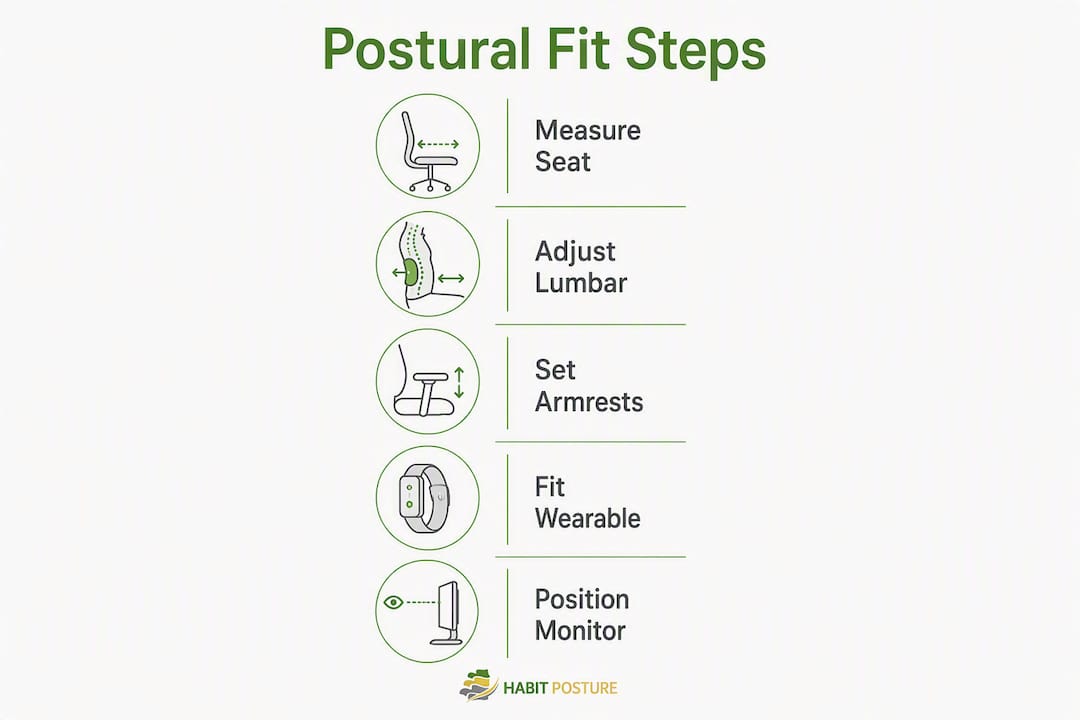
Getting the fit right takes about 20–30 minutes the first time. Follow this sequence.
Chair setup
- Set seat height first. Feet flat on the floor, knees at roughly 90°, thighs parallel to the ground.
- Adjust seat depth. Slide the seat forward or back until you have 2–3 fingers of clearance between the seat edge and the back of your knee.
- Set lumbar height. The lumbar support should press gently into the inward curve of your lower back, not into your mid-back or ribcage. Use the lumbar adjustment guide for step-by-step positioning.
- Adjust armrests. Elbows at roughly 90°, shoulders relaxed and level. Width should let your arms hang naturally.
- Test recline. Lean back gently. The chair should follow your movement without requiring you to push against it.
Wearable setup
- Place the device at your upper thoracic spine, roughly between your shoulder blades.
- Tighten straps until you feel a gentle reminder when you round your shoulders — not so tight that it restricts a full breath.
- Run a 20–30 minute training session. Biofeedback devices show measurable posture improvements in 4–8 weeks when used consistently with a structured program.
Combined routine
Fit the chair first, then put on the wearable. The chair handles passive structural support; the wearable handles active habit retraining. Together, they address both the load on your spine and the muscle patterns that keep pulling you out of alignment.
Pro Tip: After fitting both, raise your monitor so the top of the screen sits at or just below eye level. This one adjustment reduces forward head drift more than almost any other environmental change, and it multiplies the effectiveness of everything you just set up. Pair it with workplace wellness posture guidance for a complete desk setup.
Common fitting mistakes that quietly wreck your posture
Most discomfort from ergonomic products comes from setup errors, not bad products. These are the mistakes worth fixing today:
- Armrests too high. Shoulders hike up, neck tightens. Drop the armrests until your shoulders sit level and relaxed.
- Lumbar pad under the ribcage. This pushes the lower back into hyperextension. Move the support down until it sits in the natural inward curve of your lumbar spine.
- Seat too deep. The edge presses behind the knees, restricting circulation. Shorten the seat depth or add a lumbar roll to push you forward.
- Wearable straps overtightened. Restriction is not correction. Loosen until the device cues you without limiting movement.
- Wearing a rigid brace all day. Passive braces worn continuously can reduce the work your postural muscles do, which weakens them over time. Limit wear to focused sessions.
Incorrect armrest height is one of the most common and most correctable ergonomic mistakes. When armrests force the shoulders upward, the resulting neck and shoulder strain can persist even after other adjustments are made correctly. Set armrests so your shoulders stay relaxed and your wrists remain neutral at the keyboard. — Mayo Clinic, Office Ergonomics
What can you realistically expect from a good postural fit?
Systematic review evidence shows ergonomic furniture and workstation interventions consistently improve comfort and reduce work-related musculoskeletal pain. Effects on functional disability are more mixed, and ergonomic products work best as part of a broader approach that includes movement and strengthening.
Realistic benefits:
- Reduced discomfort during long sessions, often noticeable within days of a correct chair setup
- Lower mechanical load on the spine throughout the workday
- Better pressure distribution across the seat and back
- Improved postural awareness with consistent wearable use
Limits worth knowing:
- A well-fitted chair reduces load; it does not eliminate pain caused by underlying conditions
- Passive braces only help while worn; habit change requires active retraining
- Fit matters more than price: a mid-priced chair that matches your body can outperform a premium option that does not
Typical cost ranges:
- Budget lumbar add-ons and cushions: $20–$60
- Mid-range ergonomic chairs: $250–$700
- Premium ergonomic chairs: $1,000+
- Posture wearables and biofeedback devices: $70–$150
Statistic: Biofeedback posture devices used consistently with a structured program show measurable posture improvements in 4–8 weeks, while passive braces tend to only help while worn.
Should you buy a wearable, a new chair, or both?
The right first purchase depends on your primary problem.
Chair first if you:
- Sit 4+ hours per day with chronic lower back pain
- Currently use a chair with no lumbar adjustability or fixed seat depth
- Spend most of your screen time at a desk
Wearable first if you:
- Have a reasonably adjustable chair but catch yourself slouching repeatedly
- Work in multiple locations and need a portable solution
- Want active feedback rather than passive support
Both if you:
- Have both lower back pain and habitual upper-back rounding
- Budget allows and you want the fastest results
A staged approach works well on a tighter budget: start with a lumbar roll or ergonomic cushion ($20–$60) to improve your current chair’s fit, then add a wearable for habit training, then upgrade the chair when budget allows.
Pro Tip: If your chair has no vertical lumbar adjustment, a quality lumbar roll placed at the right height can close most of that gap at a fraction of the cost of a new chair. It is a high-leverage, low-cost fix while you save for an upgrade.
Your quick pre-purchase and at-home postural fit checklist
Use this before buying or after any setup change:
- [ ] Measure seat depth: 2–3 fingers of clearance behind the knee
- [ ] Set seat height: feet flat, knees at ~90°, thighs parallel to the floor
- [ ] Position lumbar support: sits in the inward curve of your lower back, not under the ribcage
- [ ] Check armrest height: shoulders relaxed, wrists neutral at the keyboard
- [ ] Wearable placement: upper thoracic, straps snug but not restrictive
- [ ] Wear schedule: wearable used in focused 20–30 minute sessions, not all day
- [ ] Recheck cadence: re-measure and readjust after any weight change, new pain, or after 4–6 weeks of training
For a 10-minute at-home validation, sit in your normal working position for 10 minutes, then stand and check for pressure marks on the back of your thighs and any shoulder tension. Both are immediate signals that something needs adjusting.
Key Takeaways
Good postural fit requires vertically adjustable lumbar support and correct seat depth in a chair, paired with a structured wearable training routine for lasting habit change.
| Point | Details |
|---|---|
| Lumbar adjustability is the top priority | Vertically adjustable lumbar support fits your spinal curve far better than a fixed foam bump. |
| Seat depth is the most overlooked spec | Aim for 2–3 fingers of clearance between the seat edge and the back of your knee. |
| Wearables train habits, not structure | Use biofeedback devices in 20–30 minute daily sessions; consistent use shows results in 4–8 weeks. |
| Fit beats price every time | A mid-priced chair that matches your body can outperform a premium option that does not fit. |
| Habitposture for layered support | Habitposture offers ergonomic chairs, adjustable lumbar supports, and posture wearables designed for 4+ hour screen sessions. |
The part most people skip
Most people buy an ergonomic chair or a posture wearable, set it up once, and assume the work is done. It is not. Postural fit is not a one-time calibration. Your body changes, your work setup shifts, and the habits you are trying to build take weeks to stabilize. The adjustment you made in week one may not be the right one in week six.
The deeper issue is that most ergonomic advice focuses on the product and ignores the system. A chair with perfect lumbar adjustment still fails if your monitor is too low and pulling your head forward. A wearable used randomly for a few minutes here and there does not build the proprioceptive habit it is designed to create. The research is consistent: physical changes alone produce small effects. The combination of a correctly fitted chair, a structured wearable training routine, and a well-positioned workstation is what actually moves the needle.
The conventional wisdom says “get a good chair.” The more useful advice is: get a chair you can adjust, learn how to adjust it correctly, pair it with active retraining, and revisit the whole setup every 4–6 weeks. That is the difference between spending money on ergonomics and actually benefiting from it.
Habitposture gear built around your postural fit
Long screen sessions demand more than a generic ergonomic label on a box, as seen in insights on why remote testing improves LSAT performance through better ergonomics and reduced anxiety. Habitposture’s lineup is built specifically for remote workers, office workers, and gamers who need real support across a full workday.
The catalog covers every layer of the system: high-back ergonomic and gaming chairs with vertically adjustable lumbar, adjustable lumbar support accessories for chairs that lack built-in adjustment, and posture wearables designed for structured daily training sessions. Each product comes with fitting guidance so you are not guessing at setup. If something does not work for your body, the support team is there to help you dial it in.
Ready to find the right fit for your setup? Browse the full Habitposture collection and start building a posture habit that actually sticks.
Useful sources
- Efficacy of Ergonomic Interventions on Work-Related Musculoskeletal Pain: A Systematic Review and Meta-Analysis (PMC) — The most comprehensive recent review of ergonomic intervention outcomes for seated workers; backs claims about comfort improvements and the limits of physical-only approaches.
- Mayo Clinic — Office Ergonomics — Primary source for armrest height guidance and general workstation setup principles.
- PostureRanked — Posture Corrector vs Ergonomic Chair — Practical overview of how chairs and wearables work as a layered system; includes the 4–8 week biofeedback timeline.
- Trusted Buyer Report — Best Office Chairs 2026 — Independent buyer testing that supports the “fit over price” principle.
- Facam.org — How to Pick a Gaming Chair for Long Sessions — Gamer-focused feature prioritization guide covering seat depth, armrests, and lumbar for 4+ hour sessions.
- Home Wellness Science — Best Posture Correctors for Desk Workers — Covers lumbar rolls and ergonomic cushions as budget-friendly alternatives when a chair lacks built-in adjustment.